

An Executive Administrative Assistant (EAA) is your administrative operating system. We guard priorities, filter noise, and move decisions forward.
Calendars, travel, email, and meetings are just levers; the result is uninterrupted executive focus and faster calls.
In disruption-prone supply-chain and logistics teams, that judgment keeps port delays, system outages, and carrier surprises from stalling the business.
This article breaks down EAA duties, shows how to write them into a clear job ad, and flags where AI can help—without eroding trust.
Scope first, title second
Job ads love tidy labels, but labels hide more than they show. The Global Skills Matrix report from the World Administrators Alliance counts over 160 titles for the same executive-support craft. One company posts an “Executive Assistant,” another a “Senior Coordinator,” a third a “Chief of Staff Lite.” On paper they match; in practice the authority, risk, and pay can be oceans apart.
Scope—not wording—sets the level. Two assistants may both adjust calendars, yet only one can push a vice-president’s review when a port closure threatens service levels. One records minutes; the other shapes a go/no-go call for the COO. Same verbs, very different stakes.
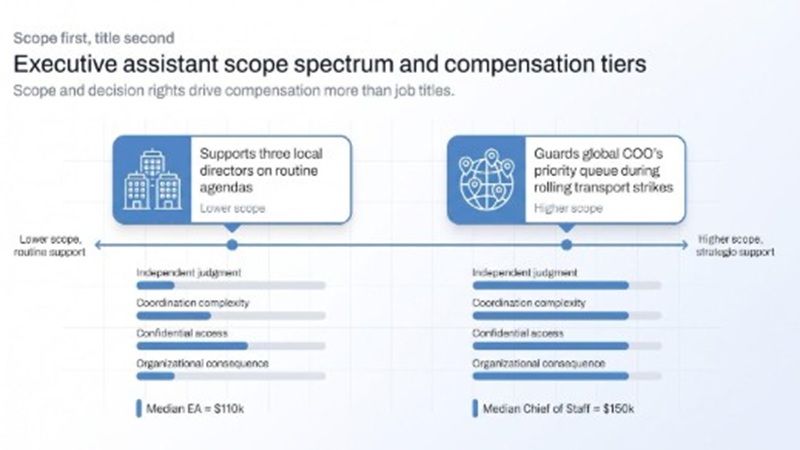
Four factors reveal the real job weight:
- Independent judgment: freedom to act without a permission loop
- Coordination complexity: people, sites, and moving parts that must align
- Confidential access: sensitivity of the information handled
- Organizational consequence: what breaks if the work is late or wrong
Plot these on a spectrum and the difference is clear: supporting three local directors on routine agendas sits at one end, while guarding a global COO’s priority queue during rolling transport strikes sits at the other. Specialist recruiters such as C-Suite Assistants first outline the calendar, correspondence, travel, and meeting-prep tasks that anchor the executive administrative assistant role and responsibilities and then back that picture with a 26-page 2026 National Salary Report drawn from more than 500 executive-support roles across 39 states; the data shows the median base jumping from $110 k for Executive Assistants to $150 k for Chiefs of Staff and maps pay by scope tier so hiring teams see how decision rights and complexity move compensation.
Protect the executive’s time and priorities
A calendar isn’t decoration; it’s the control panel for the business day. A skilled EAA guards that panel. We screen every invite before it hits the leader’s phone, stack high-value work when energy peaks, and carve out thinking space as soon as a supply-chain alert pings.
When clashes pop up, we measure revenue at risk, stakeholder urgency, and follow-on workload, then accept, decline, or reschedule. If a carrier outage strikes overnight, tomorrow’s product-launch rehearsal moves, and stakeholders hear the update within minutes.
Global teams add complexity. If Rotterdam, Chicago, and Shenzhen all want the same hour, we build a follow-the-sun cadence rather than forcing midnight calls.
Why bother? Because the gains multiply. A Double report shows executives reclaim an average of 14 hours a week when they partner with a dedicated executive assistant, and they can invest that time in higher-value work.
Fewer clashes, faster decisions, and leaders who start Monday knowing exactly where to focus: that’s calendar management as strategic guard duty.
Triage communications and manage stakeholder access
Inbox zero isn’t the goal; decision zero is. Executives face more than 120 incoming emails a day, according to the Radicati Group’s Email Statistics Report. Our job is to spot the handful that move revenue, protect reputation, or unblock operations.
We start with pattern recognition. A vendor-renewal notice triggers a template reply that copies the contract owner. A board-chair follow-up on yesterday’s KPI miss gets flagged urgent, context added, and the executive pinged within minutes. Random webinar pitches vanish.
Next comes relationship equity. We keep a live map of who matters, why they matter, and how fast they expect answers. That map shapes tone and speed: a major carrier earns a same-hour callback, while an internal FYI slides into tomorrow’s digest.
Authority closes the loop. We answer in the leader’s voice when the response is clear, request missing data when it’s not, and escalate only the threads that need executive judgment. McKinsey puts email at 28 percent of a knowledge worker’s week; every message resolved without escalation gives those minutes back to the business.
The payoff: lighter inboxes, faster clarity, and a signal across the organisation that when the assistant answers, the decision sticks.
Turn meetings into decisions and follow-through
A meeting that ends without a decision wastes everyone’s time. To avoid that, we protect three moments:
Before the call. We confirm purpose, required data, and decision-makers. A one-page agenda lands 24 hours in advance, short enough to scan, specific enough to surface questions early.
During the call. We track both clock and energy. Side issues park in a running list, action owners get named on the spot, and next steps drop into chat before laptops close.
After the call. A concise recap pairs each action with a deadline and a name, distributed within an hour so no one asks, “Who owns this?”
Why the discipline? A Korn Ferry survey found 67 percent of workers say excessive meetings block their best work. When an EAA enforces purpose, people, and follow-through, re-meet requests drop, contract approvals speed up, and issues surface in days, not weeks. Meetings shift from clutter to catalyst, and leadership momentum stays intact.
Coordinate travel, expenses, records, and administrative operations
Travel seems simple until weather diverts planes or visa rules shift mid-route. We design itineraries that survive turbulence. Each segment has a backup, confirmation numbers sit in two systems, and local contacts stand ready if connections slip. While the flight crosses time zones, we arrange ground transport, confirm site access, and build recovery blocks so decisions happen when the leader is alert, not jet-lagged. A 2023 SAP Concur survey found that 88 percent of global business travelers made last-minute changes to their trips because of disruptions.
Money moves next. Expense reports land the moment receipts post, policy exceptions surface before finance spots them, and the file closes long before the card cycle ends. The Global Business Travel Association says processing a single expense report manually takes about 20 minutes, while automation cuts both time and cost.
Records follow the same discipline. Contracts, board packs, and travel documents stay tagged, versioned, and limited to the right eyes. When audit season hits, search-and-share takes seconds, not afternoons.
Behind the scenes, we keep subscriptions current, office supplies flowing, and vendor invoices moving. You stay on strategy because every administrative cog clicks when and where it should.
Research, reporting, and special-project coordination
Fresh insight wins arguments and saves time. Knowledge workers spend nearly two hours a day hunting for information, according to McKinsey. Our job is to remove that drag.
When an executive asks, “Which 3PL handled the last on-time recovery after a port closure?” we tap approved dashboards, cross-check dates, and surface one clear recommendation, complete with cost delta and contact details, in under ten minutes.
Quarterly reviews follow the same rigor. We pull agreed KPIs from planning, warehouse, and finance systems, sanity-check gaps, and flag numbers that lack an owner. The deck lands crisp, consistent, and typo-free while analysts sleep.
Projects move at that rhythm, too. Dependencies stay visible, decision logs stay current, and updates reach the right people without flooding inboxes. Leaders walk into each meeting holding the facts instead of searching for them, and projects hit checkpoints instead of stalling in “waiting for data” limbo.
What job ads blur about those duties
Task execution versus independent judgment
Job ads love verbs—manage, prepare, coordinate—but verbs alone skip the thinking behind the motion. Anyone can drag a meeting on a calendar; the skill is choosing which slot to sacrifice when a plant shutdown scrambles production. That filter is judgment. Without it, an assistant becomes a clerk and decisions stall.
The tell: an ad that says “own the calendar” yet never states you may decline meetings. Stronger posts pair each verb with a decision right: inform, recommend, decide, or execute, so candidates know whether they steer outcomes or only tidy up after them.
Access versus authority
Plenty of ads promise “executive-level access.” Access without authority is sightseeing. Real authority sets boundaries: approve a supplier visit up to a set budget, reject suspicious payment requests, publish a press note only after legal signs off. Spell out the perimeter—data you can view, dollars you can spend, signatures you can authorise, and the red line for escalation.
The number and seniority of people supported
“Support three executives” means nothing until you name them. One global CEO can create more traffic than five regional managers. Depth (board reviews, crisis huddles) and overlap (time zones) decide workload. A chief supply-chain officer juggling plant tours and geopolitical updates plus two VPs doubles the queue overnight. List every leader, location, and expected coverage window, especially during holiday peak or audit quarter.
Role stacking and scope creep
The phrase “other duties as assigned” can hide a second job. Office manager, event planner, HR coordinator, and personal errands often slip in. ASAP’s 2023 State of the Profession report found that 65 percent of administrative professionals take on extra responsibilities outside their original descriptions. Scope creep dilutes focus and hides real cost until turnover lands. Fix it by naming which adjunct tasks are core, optional, or require more pay or headcount.
Work model, availability, and response expectations
“Remote friendly” is not a licence to ping at midnight. A clear ad states:
-
- Location—office days, remote days, site visits—with dates, not vibes.
- Coverage hours relative to executive time zones, and how exceptions earn flex time or overtime.
- Response rules: true emergencies (plant fire, data breach) override off-hours limits, everything else waits.
Defined boundaries let assistants plan rest, leaders plan escalation, and finance plan compensation.
Outcomes instead of personality adjectives
Words like “multitasker,” “rock star,” and “works well under pressure” praise personality but hide proof. Swap glitter words for numbers: cut the contract-approval cycle from five days to two, raise on-time board-pack delivery to 100 percent, eliminate preventable calendar clashes for a quarter. Outcomes anchor pay and shift the role from “nice to have” to strategic partner.
If a description leans on vibe over value, ask, “Which result measures success here?” A clear answer signals a role built for impact, not image.
How the role changes in supply-chain and logistics organisations
Disruption response and global coordination
Supply chains absorb constant shocks. McKinsey reports that 73 percent of executives have faced major supplier disruptions. When a port strike erupts or a critical part stalls in customs, minutes, not hours, protect on-time delivery. We reroute the executive’s calendar before most teams sense trouble, pull core decision-makers into a rapid stand-up, and log actions while the call is live. Because plants, carriers, and customers span continents, we juggle hand-offs so the issue follows the sun rather than the other way around. Week-long sagas shrink to contained bruises, and one calm channel carries trusted information.
Turning operational data into executive-ready information
Sensors, WMS pulls, ERP snapshots, and carrier scorecards create noise. Deloitte notes that a single smart factory can generate up to 1 petabyte of data per day. We distil that torrent into a 90-second brief covering impact, cost, and decision. Source hygiene first: only figures stamped by data owners survive. Context next: a four-hour delay means little until tied to customer penalties. Visuals stay ruthless—three charts at most: trend, root cause, action. Two verifications later, the deck locks for audit. Leaders skim, ask one question, and decide; planning, procurement, and plant schedules adjust within the hour.
Coordinating carriers, 3PLs, suppliers, customers, and sites
Logistics is a relay race; dropped batons cost money. When a contract carrier drifts, we pull last-mile KPIs, loop the transport lead, and book a decision slot in the COO’s next free half-hour, no matter the time zone. Site visits follow the same discipline: agendas, security clearance, and plant leadership align before tickets book. Commitments land in project trackers before the Zoom window closes, turning escalations into closed loops rather than email purgatory.
Supporting tailored logistics and technology initiatives
Digital roll-outs live or die on meeting prep. Whether a warehouse upgrades its WMS or the fleet tests autonomous yard trucks, executives need the same pack: scope, risk, ROI, single-sentence decision. We schedule vendor demos around shift changes, confirm NDAs, and brief presenters on hot buttons. Steering committees get agendas a week out, status decks 48 hours out, and action summaries within two hours of adjournment. Issues surface early, blockers land with the person who can clear them, and progress stays visible well past go-live. Cheap insurance against multi-million-dollar overruns.
Name the baseline systems
Every posting claims “tech-savvy,” but data shows what that really means for executive assistants:
- Productivity core. A Burning Glass report found Microsoft Office in over 80 percent of middle-skill admin roles. Master email, calendar, spreadsheets, and board-ready slides.
- Real-time collaboration. Teams, Slack, and Webex route urgent chatter; video tools like Zoom are essential, and Microsoft Teams now tops 300 million monthly active users.
- Document control. SharePoint, Google Drive, and Box lock sensitive board packs behind role-based permissions and version every tweak, critical during audits.
- Travel and expense. SAP Concur holds over 50 percent of the market. Book, approve, reconcile—done.
- Project tracking. Asana, Monday, or Jira assign owners and expose bottlenecks early; a simple Gantt works for leaders who want a snapshot, not a dashboard.
- Enterprise backbone. ERP, TMS, WMS, or control-tower views stay read-only unless the role grants edit rights. We pull shipment ETAs or stockout alerts, verify the data owner, and surface the headline so leaders act on facts, not guesses.
Master these six families and “tech-savvy” shifts from buzzword to baseline competence. The next section explores how AI can boost throughput without sacrificing trust.
Appropriate AI delegation
Think of AI as a tireless first-draft intern: helpful but never the final reviewer. A 2023 ASAP survey showed over one-third of administrative professionals already fold AI into daily work, yet human oversight remains essential.
Drafting and summarising. Copilot or Gemini can boil a 20-page vendor proposal into one, suggest three flight combinations, or tidy a messy action log while we chase higher-value tasks.
Pattern extraction. Drop a week of huddle transcripts into an approved chatbot, surface recurring blockers, and convert them into a crisp slide.
Calendar triage. Feed two conflicting invitations to an agent, layer travel buffers and focus blocks, then accept or move with one click; minutes saved here buy hours elsewhere.
Rule to live by: AI proposes, human disposes. We add context, check tone, and verify figures before anything reaches the executive. Used this way, the tech boosts throughput without harming judgment or trust.
Work that should remain human-owned
Some tasks look automatable until the stakes hit the headlines. A chatbot can’t sense the politics of bumping a board chair for a sales demo or read the silence in a tense vendor call and pause at the right moment.
- Priority trade-offs. We weigh revenue, reputation, and relationships in seconds, then move a meeting or trigger an escalation.
- Ethics filter. When legal review, sensitive employee data, or potential market manipulation lurks in a draft, only human eyes clear it.
- Relationship nuance. Negotiating a contract extension, calming a rattled customer, or lifting morale after a rough quarter still needs empathy AI cannot match.
- Accountability. Business-email-compromise scams cost U.S. firms USD 2.9 billion in 2023 alone. If a payment request copies a fake CEO, we verify through a known channel before funds move. Judgment, discretion, and final sign-off stay human because the risk lands on the company, not the algorithm.
AI and information-security guardrails
Speed is useless if it leaks secrets. The FBI’s 2023 IC3 report logged USD 2.9 billion in business-email-compromise losses, many triggered by fake executive requests that landed in an assistant’s inbox. Shadow AI use is rising too: a 2023 Salesforce survey found 52 percent of workers use generative AI without IT approval.
-
- Use approved tools only. If the company green-lights Microsoft Copilot, use it. A random social-media chatbot never sees company data. Every prompt gets a quick classification check—public, internal, or confidential. Anything above public stays out.
- Apply dual verification for money, vendor, or credential changes. A call to a known number beats any fancy AI signature. No exceptions.
- Keep audit trails. Store conversation history on sanctioned platforms and archive outputs where compliance can find them. If legal needs the exact wording of a supplier notice drafted with AI, it is there.
- Add human review every time. The model drafts; we fact-check names, figures, and dates before send. No blind trust, no copy-paste autopilot.
With these rails in place, AI amplifies productivity without spilling secrets or judgment.
Skills and qualifications that match the real scope
Titles change, but high-impact assistants share five skill clusters. Each is backed by survey or labour-market data.
1. Judgment, discretion, and anticipation
A 2023 ASAP survey reports that 75 percent of administrative professionals say their roles have become more strategic and complex. You spot an overbooked afternoon and move a meeting before it clashes or phone a sender when an “urgent” email lacks context. That instinct grows from repeated exposure to high-stakes trade-offs.
2. Executive and stakeholder communication
You translate factory-floor updates into boardroom language and shift tone by audience: direct with carriers, reassuring with customers, punchy with time-starved leaders. Clear, concise messaging builds trust faster than any personality test.
3. Data literacy, risk awareness, and governance
Dashboards, not hunches, drive modern supply-chain choices. O*NET lists electronic mail and word-processing proficiency as requirements for 100 percent of executive administrative assistant roles. You read odd spikes, keep version-controlled board packs, and raise compliance risks before auditors do.
4. Systems fluency and process improvement
Tools change; adaptability endures. Hand you a new travel portal, you map the workflow in a day. Give you a messy onboarding checklist, you streamline and document it so the backup starts two steps ahead.
5. Experience, education, and credentials
Years alone do not equal mastery, yet exposure matters. Guiding a global COO through a plant shutdown sharpens urgency more than booking conference rooms. Degrees help with business language; certifications in project management, data analysis, or governance show structured learning applied to problems. Add languages when the role spans borders; skip degree inflation when performance beats paper.
Hire for these five evidence-based capabilities and the title becomes a starting point, not a ceiling. Ignore them and even the glossiest job ad can turn into a revolving door.
How to write a job ad that does not blur the role
1. Start with a role-scope card
Place a one-page card on top of the description that answers five questions every top candidate asks:
-
- Primary executive supported
- Secondary leaders and time zones covered
- Systems and confidential data handled daily
- Decisions made without further sign-off
- Travel, site access, and after-hours expectations
Plain English beats HR shorthand. “Supports the chief supply-chain officer across Europe and Asia with authority to reschedule directors” tells more than “Provide complex calendar management.”
2. Define outcomes, not activities
Tasks describe motion; outcomes prove value. Replace “multitask in a fast-paced environment” with lines finance can audit:
- “Cut the contract-approval cycle from five days to two by Q3.”
- “Reduce recurring meeting hours twenty-five percent while lifting action-item closure to ninety-five percent.”
Numbers protect both sides. Managers get a scoreboard, and assistants gain leverage in reviews.
3. Align work model and compensation with scope
State where and when the work happens, and pay for that reality. On-site three days for plant tours? Say so. Coverage across Shanghai, Chicago, and Rotterdam? List core hours and the buffer that earns flex time or overtime. Compensation follows scope, not title, so layer geography, span of support, strategic depth, and after-hours load on top of national medians.
4. Assess judgment, not just tool familiarity
Screenshots of calendars prove little. Instead, present live scenarios:
- A supplier requests same-day signature while a VIP tour arrives and the COO’s flight is cancelled. What is your first move?
- A suspicious vendor-payment request appears. Flag the red flags and outline verification steps.
- A dashboard shows shipment delays suddenly drop. Ask whether the metric changed or performance improved.
Watch the thinking, not the keystrokes.
5. Remove common red flags
Seasoned assistants spot these instantly:
- “Other duties as assigned” with no ceiling
- Unlimited availability
- Executive support plus office management, events, or personal errands under one salary band
- Vague authority paired with heavy accountability
- Appearance rules unrelated to performance
- AI buzzwords without approved tools or governance
Strip them out, or strong candidates will scroll past.
Questions candidates and hiring managers should resolve before the offer
Questions the hiring manager should answer
-
- What outcome slipped because the executive lacks support today?
- Which decisions can the assistant make without escalation, and where is the red line?
- Who else receives primary or backup support, and in which time zones?
- Which systems and confidential data will the assistant touch on day one?
- How will success be measured after three, six, and twelve months?
- What coverage plan activates when the assistant is on leave?
Short, direct replies expose workload, authority, and risk in one sweep. If any answer feels vague, revisit the role and its budget before posting.
Questions the candidate should ask
-
- How often do urgent requests land outside core hours, and what counts as urgent?
- Where do personal tasks, office management, or project coordination rank in the priority stack?
- Why did the previous assistant leave, and what has changed since?
- Which AI and collaboration tools are approved, and which are off-limits?
- How does the company reward process improvements that save time or money?
Each question maps to judgment, authority, or outcome—the trio that separates a strategic partner from a task taker.
Signs the role is probably misclassified
- Low-level title paired with board-level responsibility (pay mismatch).
- Unlimited “other duties” with no admin budget (burnout risk).
- Accountability for projects without resources or decision rights (future bottleneck).
Frequently asked questions
Is an executive administrative assistant the same as an executive assistant?
Often the titles blur, but scope matters more than wording. Some firms label every senior support role “executive assistant,” while others reserve that tag for fully strategic partners and use “EAA” for task-focused support. Check three clues: decision rights, judgment expected, and stakeholder access. Those signals reveal whether the role is a calendar gatekeeper or an operating ally.
Can an executive administrative assistant work remotely?
Yes, if the support model, security rules, and time-zone coverage align. A 2023 U.S. Bureau of Labor Statistics report notes that 27.5 percent of U.S. employees teleworked at least part-time, with office and administrative roles often higher. Remote support succeeds when tools, expectations, and backup coverage are locked in before day one and when on-site moments—board meetings, plant tours, crisis huddles—are spelled out in advance.
What is a reasonable salary?
The U.S. Bureau of Labor Statistics lists the May 2023 median annual wage for executive secretaries and executive administrative assistants at USD 68,240. Treat that as a starting anchor, then layer geography, span of support, strategic depth, and after-hours load on top. Guarding one regional VP’s calendar pays less than shielding a global COO from multimillion-dollar disruption. Tie pay to scope and measurable outcomes—decision speed, action closure, and risk reduction—and compensation talks shift from guesswork to value delivered.
Conclusion
An executive administrative assistant is defined by scope, not title. Judgment, decision rights, confidential access, and the cost of a missed handoff decide how much the role is worth, especially in supply-chain teams where a port closure or carrier failure can rewrite the week. Write those realities into the job ad: name the leaders supported, the decisions the assistant can make, the systems and data involved, the coverage hours, and the outcomes that define success. Resolve the open questions on both sides before signatures, and the offer letter becomes the start of a trusted partnership, not round one of a scope dispute.
 Should you put a mitre box in a fish tank?
 Retail sales see 5.1% spike, volumes remain low as inflation grips UK
 New software capability delivers higher levels of operational efficiency, profitability & customer service
 Symphony RetailAI and Zebra Technologies establish strategic alliance
 What Is The Importance Of Mechanical Testing?
 John Galt Solutions Enhances Multi-Objective Optimization Capabilities