

The best facilities management software is the one that matches how an organization runs its buildings, maintains its assets, and governs its operational data.
Key takeaways
- Choose between packaged facilities software, a self-built application, a dedicated CMMS and an IWMS based on the workflows, data ownership and specialist capabilities your organization needs.
- A dedicated CMMS is the better starting point when technician mobility, spare parts and equipment reliability drive the decision. An IWMS makes sense when leases, space and portfolio planning must sit alongside maintenance.
- Compare total cost over three to five years, including licenses, implementation, integrations, training and ongoing support. Test representative workflows before committing to a platform.
The best facilities management software at a glance
| Rank / solution | Best for | Deployment model |
| 1. SP Facilities Manager | Microsoft 365 organizations seeking a complete facilities operations app | Microsoft 365-native PaaS app |
| 2. MaintainX | Mobile-first maintenance teams | Standalone CMMS |
| 3. UpKeep | Multi-site maintenance operations | Standalone CMMS |
| 4. Limble CMMS | Preventive maintenance and equipment reliability | Standalone CMMS |
| 5. FMX | Schools and campuses with event and facility scheduling needs | Standalone facilities / CMMS platform |
| 6. Eptura Asset | Asset-intensive enterprises | Standalone asset management platform |
| 7. Planon | Enterprise workplace and real estate portfolios | IWMS |
| 8. Microsoft Lists + Power Platform | Small teams with simple requirements and internal build capacity | Self-built Microsoft 365 solution |
How were the eight options selected?
The guide screened 15 facilities management approaches using publicly available product information in November 2026 and shortlisted eight that represent distinct buying requirements.
Fiix, eMaint, Siemens Asset Essentials (formerly Brightly), ServiceChannel, Facilio, IBM Maximo Real Estate and Facilities, and MRI Evolution remain credible alternatives, particularly for industrial maintenance, outsourced services or complex estates.
Options were compared on operational coverage, usability for requesters and technicians, deployment architecture and data control, integration, specialist functionality, and implementation and administration burden.
Rankings reflect editorial fit for the use cases covered, with particular weight on Microsoft 365 organizations.
Which type of facilities management software do you need?
Choose the architecture before the vendor.
The two most common procurement mistakes are buying an advanced maintenance product when the real problem is getting employees to report faults, and commissioning a custom app when mature facilities workflows already exist in a ready-built product.
| Approach / examples | Commercial advantages | Trade-offs |
| Microsoft 365-native PaaS app (SP Facilities Manager) | Prebuilt workflows in the existing tenant; accessed through Teams and SharePoint; configurable without a ground-up build | Requires Microsoft 365 and vendor licensing; tenant governance still applies; verify specialist mobile needs |
| Self-built Microsoft 365 solution (Lists + Power Platform) | Full design control; reuses existing entitlements; can start small | Internal team owns build, changes and support; premium licensing can add cost |
| Standalone CMMS / facilities SaaS (MaintainX, UpKeep, Limble, FMX, Eptura Asset) | Purpose-built maintenance and mobile features; vendor maintains the platform | Separate data environment; identity, reporting and integrations need configuring |
| Enterprise IWMS (Planon) | Links facilities with space, real estate and portfolio planning | Heavier implementation and data migration; often excessive for routine maintenance |
What should buyers look for in facilities management software?
A useful platform connects the person reporting a problem, the team resolving it, the affected asset and the evidence of completion. Use these requirements as the basis of an RFP or product demonstration.
| Capability | Why it matters | What to test |
| Employee self-service | Inconvenient reporting leaves requests scattered across email and chat | Submit a request as an ordinary employee; check routing and status visibility |
| Work order management | Priorities, ownership and escalation decide whether jobs close on time | Assign an urgent job by location or trade, reassign it and capture completion evidence |
| Preventive maintenance | Recurring schedules prevent missed inspections and avoidable breakdowns | Create a recurring job; confirm overdue alerts and rescheduling |
| Asset records | Repair history and cost inform replacement decisions | Find an HVAC unit, its components, past repairs and asset-level costs |
| Contractor coordination | External work needs clear responsibility and proof of completion | Send a job to a contractor; verify permissions, status and closeout |
| Mobile execution | Technicians often work away from a desk or with poor connectivity | Complete a job on a phone; test offline mode if essential |
| Security and data ownership | Records may hold sensitive site and infrastructure detail | Confirm storage location, access controls, retention, audit logs and export rights |
| Reporting and multi-site control | Managers need comparable data across sites, workloads and costs | Show overdue work, completion rates, backlog age and asset spend by site |
The eight best facilities management options in detail
SP Facilities Manager: best for Microsoft 365 organizations
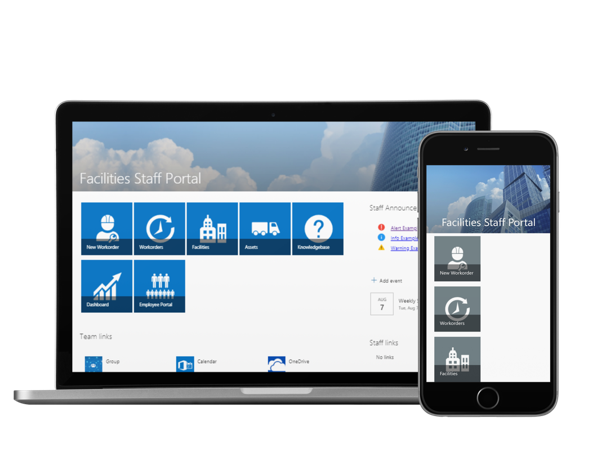
SP Facilities Manager is a ready-built, configurable facilities management app that SP Marketplace delivers as a platform-as-a-service (PaaS) on SharePoint, Microsoft Teams, Power Automate and Power BI.
The app and its facilities records reside in the customer’s own Microsoft 365 tenant instead of a separate vendor-hosted cloud, which places it between buying standalone SaaS and asking IT to build a bespoke system.
- Employee adoption: the MyFacilities portal gives staff a familiar place to submit and track requests, while facilities teams assign and manage work in the Microsoft environment they already use.
- Connected operations: reactive and recurring work orders, planned maintenance, parent/child assets, asset costs, contractor assignments, documents and dashboards sit in one app.
- Tenant-level data control: SP Marketplace states there is no SP Marketplace cloud or external database for the app, so existing Microsoft identity and governance policies can apply, subject to configuration.
- A configurable starting point: teams adapt workflows and forms instead of designing the data model, portals and automation themselves. IT stays involved in governance without having to become the software developer.
- Government cloud: SP Marketplace states the app is compatible with Microsoft 365 GCC and GCC High environments, subject to feature and connector availability in the specific tenant. Compatibility is not a guarantee of regulatory compliance.
Best fit: multi-site businesses, nonprofits, professional services, retail and regulated organizations already on Microsoft 365, especially where employees need a simple way to request facilities services and IT wants to minimize additional cloud platforms.
Consider alternatives if:
Ask in the demo: to follow a request from MyFacilities to a work order, contractor assignment, asset history and reporting, and for a deployment and licensing proposal for your own tenant, including who owns future configuration and support.
Learn more: SP Facilities Manager for SharePoint and Microsoft Teams
MaintainX: best for mobile-first maintenance teams
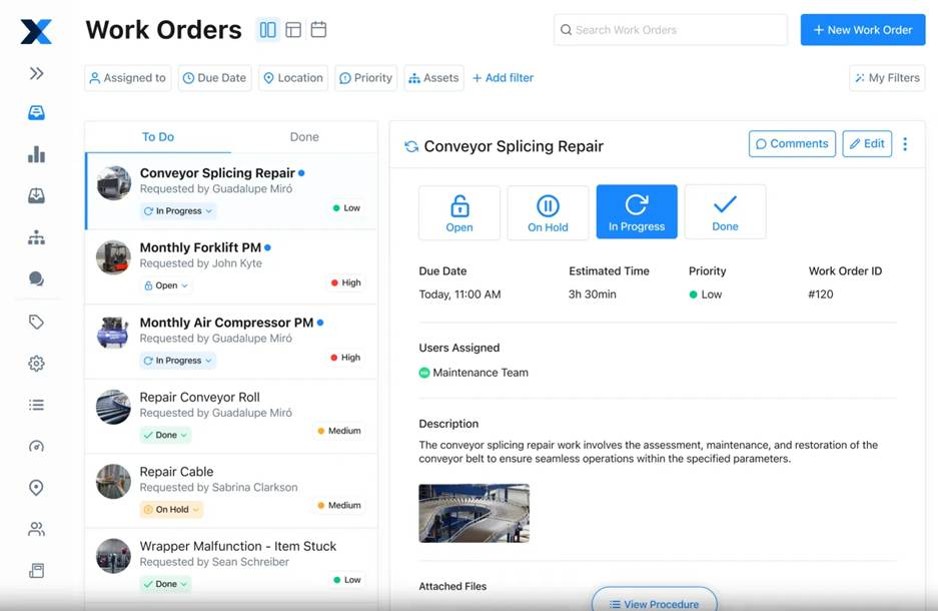
MaintainX is a mobile-oriented maintenance and asset management platform for teams working on shop floors, in plant rooms or across distributed sites.
Its emphasis is on giving technicians access to the information needed to complete jobs at the point of work, while managers coordinate maintenance across equipment, teams and locations.
- Mobile execution: Technicians can open assigned work orders on a phone, scan asset or location codes, capture photos, record time and add comments as they complete repairs. That reduces the need to return to a workstation to update records.
- Digital procedures: Reusable procedures and checklists give teams a consistent way to perform inspections, routine servicing and other repeatable tasks. They can attach instructions to work orders rather than relying on paper manuals or individual knowledge.
- Asset and parts visibility: Maintenance teams can connect jobs with equipment and spare parts, creating a record of completed work and the resources used. This helps managers review recurring faults and plan future work.
- Multi-site operations: The platform supports organizations standardizing maintenance procedures and reporting across facilities. Site leaders can manage their own work, while central management can review trends across locations and identify where processes differ.
- Deployment and integration: MaintainX operates as a standalone cloud service. Organizations should confirm identity integration, reporting connections, offline functionality and access permissions against the proposed subscription before deployment.
Best fit: manufacturers, warehouses, utilities and service organizations where technicians spend much of the day away from desks and need procedures, work orders and asset information on mobile devices.
Consider alternatives if: your main requirement is a simple employee facilities request portal, tenant-native Microsoft 365 deployment or strategic real estate management rather than a maintenance-focused platform.
Ask in the demo: for a technician to complete an inspection, record a fault, attach evidence and close a job on a phone. Compare cross-site reporting, offline behavior and licensing for every required role.
Learn more: MaintainX facility management
UpKeep: best for multi-site maintenance operations
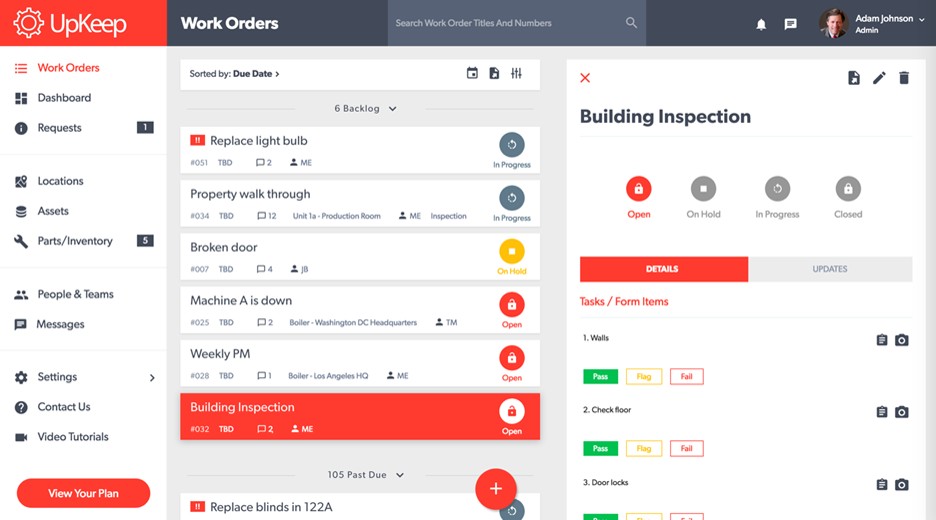
UpKeep is a cloud-based CMMS covering corrective and preventive work, assets, parts inventory and mobile technician workflows, relevant to distributed retail, hospitality, property and service operations.
Its commercial appeal is the ability to establish common maintenance processes across locations without requiring each property or operating site to develop its own system for handling requests and tracking equipment.
- Centralized work orders: Site managers and technicians can use a shared system for incoming requests, corrective repairs and planned work. Priorities and assignments provide a more consistent record of responsibility than separate inboxes or spreadsheets.
- Multi-site control: UpKeep supports location-based access and reporting, allowing operational teams to focus on their own sites while regional managers review the wider maintenance portfolio. Confirm the scope of multi-site controls in the quoted plan.
- Preventive maintenance: Recurring work orders help teams organize inspections, servicing and other scheduled activities. A consistent schedule across similar equipment makes it easier to compare overdue work and investigate variation between locations.
- Assets and inventory: Equipment records, repair histories and parts inventory support decisions about repeat breakdowns, replacement and stock availability. Maintenance managers can compare resource use and identify where stock or maintenance processes need attention.
- Mobile and cloud deployment: The separate cloud platform supports mobile maintenance workflows, including offline options depending on subscription. Confirm how Microsoft identities, external contractors, integrations and data exports would be managed across the organization.
Best fit: distributed retail, hospitality, property management, manufacturing and service businesses that need consistent maintenance processes with local accountability and central oversight across multiple locations.
Consider alternatives if: you only need a basic request register, require all operational records to reside in Microsoft 365, or need extensive lease and workplace portfolio functionality.
Ask in the demo: for an urgent repair to be submitted at two sites, assigned locally and reported centrally. Check location-specific permissions, offline synchronization, parts usage and the cost of adding future sites.
Learn more: UpKeep maintenance management
Limble CMMS: best for preventive maintenance and reliability
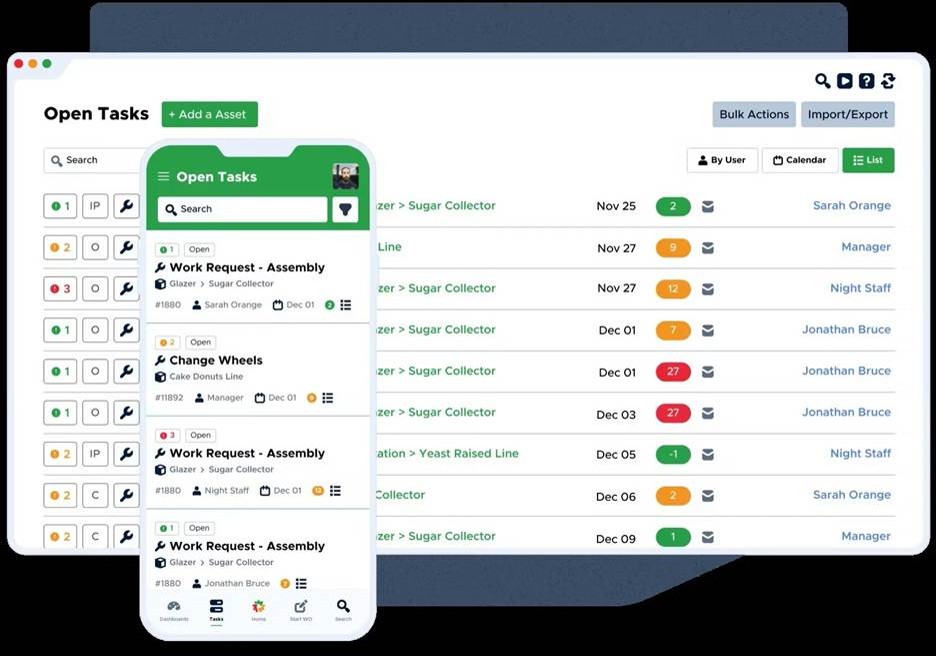
Limble is a maintenance SaaS platform for organizations moving away from reactive repairs, with structured preventive schedules, work history and inventory management.
Its focus is on making maintenance more predictable by connecting recurring work, asset histories, technician activity and spare parts, rather than treating repairs as isolated tasks recorded only after something breaks.
- Preventive scheduling: Limble can automatically create work orders from established preventive maintenance schedules and notify the responsible team or individual. This provides a structured approach to recurring inspections and servicing rather than relying on calendar reminders.
- Equipment history: Maintenance records sit alongside equipment information, enabling teams to review past repairs, outstanding work and upcoming tasks for an asset. This helps identify recurring issues and provides context when a different technician takes over.
- Work requests and mobile access: Employees can report problems and technicians can manage assigned work using mobile tools. Asset-based requests and task instructions help maintenance staff collect more consistent information before investigating a fault.
- Parts and purchasing: Inventory features connect spare parts with maintenance activity, and purchasing capabilities can support replenishment. Buyers should evaluate whether the product can represent their stock locations, supplier relationships and existing procurement approval processes.
- Reporting and implementation: Limble offers reporting on maintenance activity and can support migration of historical records. As a standalone application, it requires a separate data environment; confirm identity, reporting integrations and the availability of desired features by plan.
Best fit: manufacturing plants, distribution facilities and maintenance teams looking to improve preventive maintenance completion, equipment reliability and visibility of asset-level work history.
Consider alternatives if: employee workplace services, event reservations, complex property management or Microsoft 365-native deployment are more important than specialist maintenance functionality.
Ask in the demo: for a preventive schedule on critical equipment, including a missed-task notification, technician completion, parts consumption and the updated asset history. Confirm whether required reporting and mobile features are included.
Learn more: Limble preventive maintenance
FMX: best for schools and campuses
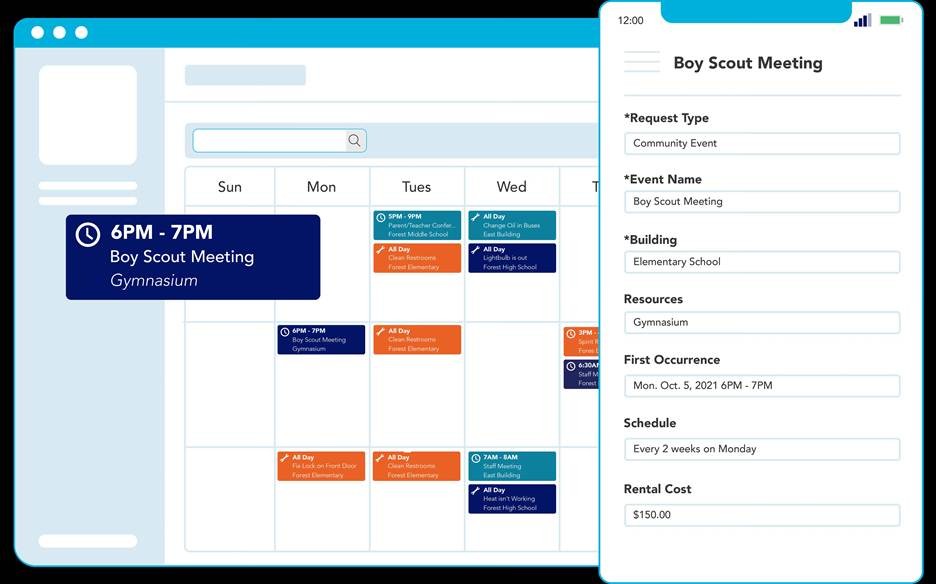
FMX combines facilities and maintenance management with scheduling and reservations across work, events, inventory, capital planning and utilities, which makes it relevant for schools, campuses and other shared-use properties.
Its distinguishing feature is the combination of maintenance operations and shared-facility scheduling, particularly relevant when the same buildings must accommodate teaching, athletics, community activities and maintenance work throughout the year.
- Maintenance requests: Staff can submit facilities problems and maintenance teams can assign, prioritize and track resulting work. A shared record gives administrators visibility of outstanding jobs rather than relying on individual email threads.
- Event and facility reservations: Scheduling capabilities allow organizations to coordinate bookings across shared facilities. This matters when multiple groups need access to classrooms, sports venues, meeting spaces or other resources on the same site.
- Preventive maintenance: Recurring inspections and servicing can be planned alongside reactive work. Facilities managers can evaluate how planned jobs affect building availability and coordinate schedules around academic terms, events and periods of reduced occupancy.
- Assets and long-term planning: FMX offers capabilities for inventory, capital planning and utilities in addition to maintenance. These can help facilities leaders connect day-to-day work with longer-term investment decisions, subject to the modules included in the deployment.
- Deployment and administration: FMX is a separate cloud platform, with functionality spanning multiple products. Confirm requester access, scheduling permissions, Microsoft identity or calendar integrations, implementation support and the cost of each module needed by your organization.
Best fit: K-12 school districts, colleges, universities, local government sites and other shared-use properties that must balance maintenance, resource availability and event scheduling.
Consider alternatives if: you need sophisticated industrial maintenance, full commercial lease management, or prefer a facilities solution that keeps its operational records inside an existing Microsoft 365 tenant.
Ask in the demo: for a sports facility reservation and a planned maintenance job that overlap, showing how the conflict is handled. Review requester permissions, approval workflows, reporting and the licensing implications of adding sites.
Learn more: FMX facilities management software
Eptura Asset: best for asset-intensive enterprises
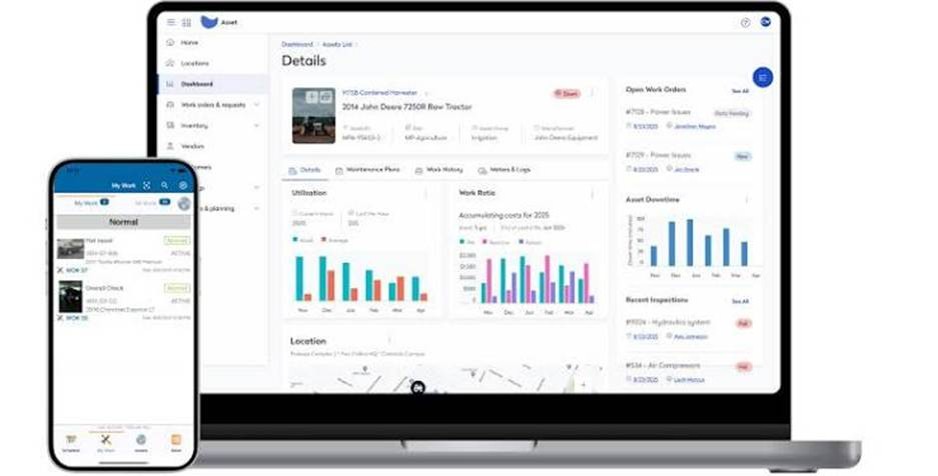
Eptura Asset is designed for organizations managing equipment, building assets and maintenance across complex operations, with work orders, inventory, inspections, planned maintenance and asset reporting.
It is suited to organizations that need to understand the performance, maintenance requirements and costs of a substantial equipment portfolio, with decisions extending beyond the completion of individual work orders.
- Asset lifecycle visibility: The asset register connects equipment records with maintenance activity and cost information. This provides managers with a basis for reviewing reliability and deciding whether to continue maintaining, refurbish or replace equipment.
- Planned and corrective maintenance: Teams can coordinate routine inspections, preventive schedules and reactive repairs in a common system. Work histories provide an operational record that managers can review when investigating repeat failures or planning servicing.
- Inventory and purchasing: Inventory management links maintenance requirements to parts availability. Buyers with large equipment portfolios should evaluate how the platform handles stock locations, purchase orders and the transfer of parts between facilities.
- Inspection and field operations: Maintenance workflows support inspections and execution away from the office. Organizations should demonstrate how technicians access relevant asset details, record results and capture evidence for the specific inspection processes they operate.
- Enterprise integration: Eptura Asset sits within a broader workplace and asset software portfolio, with opportunities to connect maintenance data to other operational systems. Check which integrations and modules are separately licensed, where records reside and who owns implementation.
Best fit: asset-intensive manufacturers, utilities, infrastructure operators and large facilities teams that need equipment maintenance, inventory and lifecycle decisions to be informed by a shared operational record.
Consider alternatives if: you primarily need an employee request portal or a lightweight work order system, or require a native Microsoft 365 deployment rather than a separate enterprise asset platform.
Ask in the demo: for a critical asset’s complete maintenance history, inspection records, parts usage and cost profile across multiple facilities. Confirm data migration, integration responsibilities, asset hierarchies and exactly which products appear in the proposal.
Planon: best for enterprise workplace and real estate management
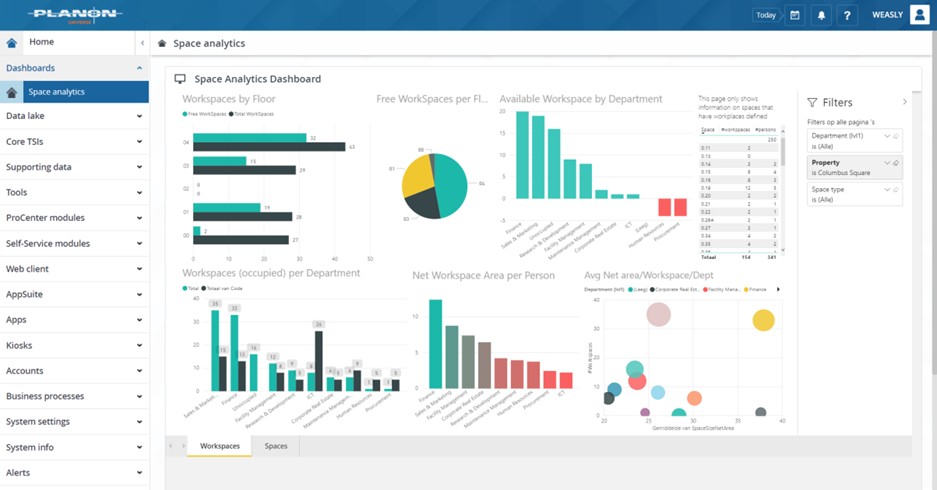
Planon is an integrated workplace management system spanning facilities maintenance, space and workplace services, real estate and sustainability, covering strategic estate management as well as daily operations.
The proposition is broader than maintenance management: property and facilities teams can connect the physical estate with the services, occupancy, financial commitments and sustainability objectives that shape longer-term workplace decisions.
- Real estate portfolio management: Planon supports management of leases, property information, transactions and related financial data. This is relevant for organizations that need a portfolio-wide perspective on property commitments as well as day-to-day facilities service delivery.
- Space and workplace services: Space information and workplace services can be managed alongside building records, helping teams understand utilization and occupancy requirements. Buyers should test how floor plans, reservations and workplace changes are represented across their portfolio.
- Asset and maintenance management: The IWMS includes maintenance capabilities covering planned activity and service delivery against building assets. This lets property and operations teams consider maintenance alongside wider real estate plans rather than using disconnected systems.
- Energy and sustainability: Planon provides functionality for energy and sustainability management. Organizations should evaluate reporting scope, data collection requirements and integration with building systems against their environmental targets and reporting obligations.
- Microsoft and enterprise integration: Planon describes integration with Microsoft Places for workplace use cases, alongside its broader platform integration capabilities. This connects selected workplace processes to Microsoft tools but does not make the full IWMS native to Microsoft 365.
Best fit: large corporations, universities, public-sector estates and real estate organizations managing complex buildings, leases, workplace services and portfolio-level planning across multiple locations.
Consider alternatives if: your business only needs routine maintenance requests, mobile work orders or a small tenant-native facilities app; a full IWMS may introduce unnecessary implementation scope and ongoing administration.
Ask in the demo: for one property to be followed from its lease and space records through maintenance and portfolio reporting. Review migration, configuration, module licensing and Microsoft integration responsibilities before comparing total costs.
Microsoft Lists and Power Platform: best for a small, self-built facilities system
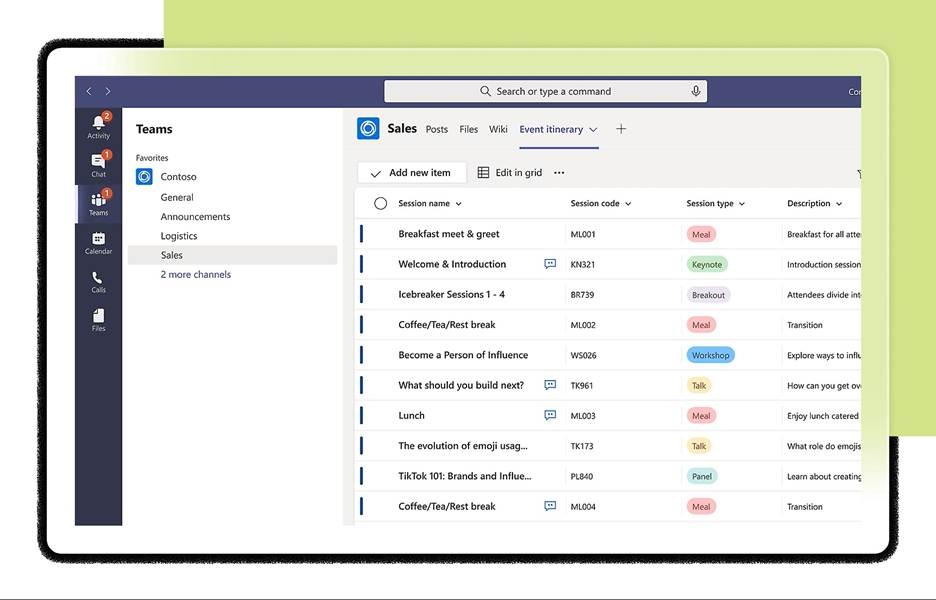
Microsoft Lists and SharePoint can hold a basic facilities request register, with Power Apps for tailored forms, Power Automate for routing and reminders, and Power BI for reporting. This is a build-your-own approach, and no finished facilities product is included.
The approach appeals to organizations with defined requirements and an internal Microsoft development capability, because it lets them design the request process around their own operating model rather than adopt a vendor’s preconfigured workflows.
- Request and asset records: Microsoft Lists and SharePoint provide configurable records for requests, locations, equipment and supporting documents. Teams can begin with a simple register, then add relationships and views as requirements evolve.
- Tailored user experience: Power Apps allows developers or makers to create forms and interfaces designed around specific roles. An organization can build a focused employee request experience and separate tools for administrators or maintenance staff.
- Workflow automation: Power Automate can route new requests, notify owners and manage approvals. Recurring maintenance, escalation rules and robust error handling can also be designed, but the organization must build, test and support those workflows.
- Data and reporting control: SharePoint-hosted records can sit in the organization’s Microsoft 365 tenant, with reports built using Power BI. Data storage depends on the architecture selected, especially if Dataverse, premium connectors or external services are introduced.
- Licensing and governance: Existing Microsoft licenses may cover some basic functionality, while advanced connectors and capabilities can require additional licenses. The organization owns development, permissions, testing, documentation, change management and ongoing support for its custom application.
Best fit: small teams with straightforward requests and approvals, or organizations with established Power Platform expertise and a deliberate strategy to build and maintain their own operational applications.
Consider alternatives if: you do not have internal development capacity, require a comprehensive out-of-the-box maintenance or facilities platform, or cannot allocate ongoing ownership for changes, testing and support.
Ask before building: for a proof of concept covering requests, recurring work, asset history, contractor permissions and reporting. Compare the effort to build and maintain it over three to five years, including premium licenses.
5 things to ask suppliers before signing a contract
-
- Demand a scenario-based demo using a real maintenance request, preventive schedule and asset record, completed live in front of you.
-
- Establish the data boundary: where records and attachments are stored, what data passes to third parties, how permissions work and how data can be recovered or exported.
-
- Test adoption across roles, including an employee who submits requests, a technician, a contractor, a manager and an IT administrator.
-
- Agree how success will be measured before implementation, using baselines for request handling time, overdue jobs, preventive maintenance completion, repeat failures and asset downtime.
-
- Verify delivery and support: who migrates records, configures the system, supports changes and resolves incidents, with references from customers with comparable requirements.
Frequently asked questions
Does Microsoft 365 have facilities management software built in?
Microsoft 365 provides tools for building facilities workflows, but it does not include a complete facilities management application as standard. SP Facilities Manager is a third-party app that runs on Microsoft 365; it is not a Microsoft product.
What is the difference between facilities management software, CMMS and IWMS?
Facilities management software supports building services, requests, assets and maintenance. A CMMS concentrates on maintenance execution and equipment reliability. An IWMS adds strategic workplace, space and real estate management. Some products cross these boundaries.
Is Microsoft 365-native software less expensive than SaaS?
Not automatically. It can reduce the need for separate data integrations and custom development, but application licensing, implementation, Microsoft entitlements and ongoing management still belong in the comparison.
What is the best facilities management software for Microsoft Teams?
For organizations that want facilities workflows and records to stay inside their Microsoft 365 tenant, SP Facilities Manager is our recommended starting point.
Where specialist maintenance or real estate capabilities matter more, evaluate dedicated CMMS or IWMS products and their Teams integrations.
Which facilities management software should Microsoft 365 organizations choose?
For organizations committed to Microsoft 365, the first question is whether they need another standalone platform at all.
SP Facilities Manager offers an alternative to both separate facilities SaaS and a custom build, with prebuilt facilities processes inside the existing tenant.
Where mobile maintenance, reliability engineering or real estate portfolio management is the main requirement, a specialist platform may justify the additional investment.
Choose the architecture and operating model first, then the vendor.
 Top Challenges IT Teams Face in Managing Hybrid Cloud Security
 The Art of Leveraging Technology in Comprehensive Workforce Planning
 Half of global wholesalers feel threatened by manufacturers selling direct
 New Study Reveals Value of Expert Managed Services to Maximize the Benefits of Multicloud
 Real Estate Compliance: A Comprehensive Checklist
 Syncron Announces New Addition to Executive Committee with the Appointment of Keith A. Charron as Chief Sales Officer