

For many manufacturers, product launches are no longer limited by engineering or production timelines. Instead, delays often come from something less obvious: product visuals.
Catalog teams, ecommerce managers, and marketing departments all need consistent, accurate images before a product can go live.
When a product line includes multiple configurations, finishes, and accessories, traditional photography can slow things down. Each change may require new shoots, additional editing, and repeated approvals.
For teams managing dozens or hundreds of SKUs, this process becomes a bottleneck.
This playbook outlines how manufacturing and ecommerce teams can organize product visualization workflows to support faster launches, fewer revisions, and scalable visual content.
Why Product Launches Get Delayed by Visual Bottlenecks
Manufacturers frequently discover that product imagery becomes the last missing piece before launch. A product may be engineered, priced, and ready for distribution but ecommerce listings and catalogs remain incomplete.

Common causes include:
- Repeated product photography for small variations
- Misalignment between engineering and marketing teams
- Inconsistent image specifications across channels
- Late-stage requests for additional angles or detail shots
When product visuals depend entirely on physical samples, the timeline becomes tied to shipping, studio scheduling, and reshoots. This slows down speed-to-market and creates unnecessary friction between departments.
Where 3D Helps More Than Repeated Product Photography
3D visualization workflows allow manufacturers to create visual assets directly from product design data instead of waiting for finished samples.
This approach is especially useful when dealing with:
- Variant-heavy product lines
- Modular configurations
- Multiple finishes or materials
- Early-stage product launches
Instead of photographing each variant separately, teams can reuse a single base model and generate different outputs as needed.
This reduces production delays while ensuring consistent visual standards across catalogs, ecommerce product pages, and marketing materials.
What Inputs Reduce Revision Cycles from the Start
Many revision cycles occur because visual teams receive incomplete product information. Establishing a clear input package helps minimize corrections later.
CAD or Technical Drawings
Engineering files provide accurate geometry and proportions. These files ensure that product dimensions and structures are correct from the start.
Dimensions
Even with CAD data, documented dimensions help validate proportions and maintain consistency across visual assets.
Finishes and Materials
Manufacturers should provide:
- Material specifications
- Surface finishes
- Color references (RAL, Pantone, or internal codes)
Material accuracy is critical for product visualization workflows.
Reference Photos
Prototype or factory photos help visual teams understand surface texture, reflections, and assembly details.
Packaging and Accessory Notes
Some visuals require accessory components or packaging elements. Providing this information early prevents later revisions.
What Deliverables Commerce and Catalog Teams Actually Need
Manufacturing teams often underestimate how many visual assets are required for product listings.
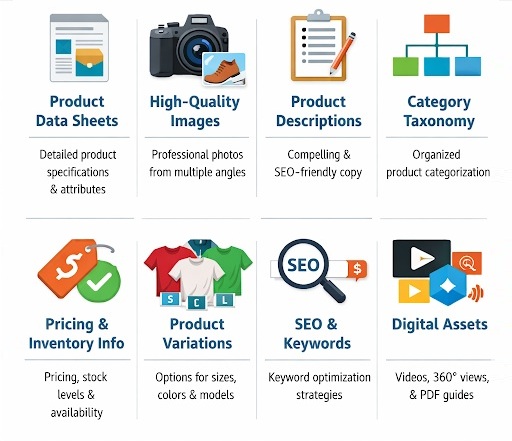
Typical deliverables include:
Hero Images
The main product image used on ecommerce product pages and catalogs. These usually follow strict format guidelines.
Detail Shots
Close-ups highlighting features such as:
- hardware components
- textures
- joints or mechanisms
These images support product descriptions and technical explanations.
White Background Exports
Many marketplaces require clean white backgrounds for product listings.
Consistent Dimensions and Formats
Images must follow consistent:
- aspect ratios
- resolution standards
- cropping formats
Consistency simplifies catalog management.
Variant-Ready Outputs
For products with multiple options colors, materials, or configurations visual systems should allow easy generation of variant images.
Product Launch Visual Readiness Checklist
Before starting visual production, manufacturers should confirm the following items are ready:
Product launch visual readiness checklist
- CAD models or technical drawings available
- Verified product dimensions
- Material and finish specifications documented
- Reference photos provided (if available)
- Variant structure defined (configurations, finishes, accessories)
- Image format requirements defined (catalog, ecommerce, marketing)
- Approval stakeholders identified
- Final naming conventions for files and SKUs
- Launch timeline aligned with content production
Completing this checklist early helps prevent delays during visual production.
Mini Example: One Product, Eight Configurations, Three Finishes
Consider a manufacturer launching a modular desk lamp.
The product includes:
- Two base options
- Four arm configurations
- Three finishes
This results in multiple product variations.
What Can Be Reused
With structured visualization workflows:
- The base product model remains the same
- Lighting setups remain consistent
- Camera angles are reused
- Packaging visuals stay unchanged
What Changes
Only a few elements require updates:
- material finish
- configuration components
- SKU identifiers
How This Shortens Launch Preparation
Instead of photographing every variation individually, the visual team can generate all configurations from a single master setup.
This significantly reduces time spent coordinating studios, shipping samples, and repeating approvals.
Common Failure Points
Even with a structured workflow, several issues frequently slow down product visualization.
Inconsistent Scale
Incorrect scaling between components leads to unrealistic product visuals.
Weak Material Realism
Poor material references often result in inaccurate finishes that require revisions.
Wrong Lighting Logic
Lighting that doesn’t match real-world product behavior reduces credibility.
Overcomplicated Briefs
Excessive creative direction can introduce unnecessary complexity for catalog imagery.
Missing Approval Checkpoints
Without defined approval stages, teams may discover problems late in the process.
How to Build a Reusable Visual Asset System
Manufacturers benefit most when product visuals are treated as reusable assets rather than one-off marketing materials.
A structured system typically includes:
- standardized camera angles
- repeatable lighting setups
- consistent file formats
- modular product models
Using structured product visualization for manufacturers allows catalog teams to scale visual production across large product lines while maintaining consistency.
Teams exploring scalable workflows often rely on 3D product rendering pipelines to standardize manufacturing product visuals across SKUs, finishes, and configurations without the delays that repeated photography cycles create. This approach helps content operations maintain consistent ecommerce product images while improving overall speed to market.
Over time, this creates a reusable visual library that supports:
- catalogs
- ecommerce product pages
- distributor portals
- marketing materials
FAQs
Do Manufacturers Need CAD to Start?
CAD files are highly recommended because they provide precise geometry. However, technical drawings, dimensions, and reference photos can also support visualization workflows.
Can 3D Visuals Replace All Product Photography?
Not entirely. Lifestyle marketing imagery and real-world usage photography still play an important role. However, many catalog and ecommerce product images can be produced using 3D workflows.
How Should Teams Approve Accuracy?
Accuracy approvals should involve:
- engineering teams verifying dimensions
- product managers confirming configurations
- marketing teams reviewing final presentation
Structured checkpoints reduce late-stage corrections.
How Can Visual Assets Be Reused Across Channels?
Reusable visual assets can support multiple outputs, including:
- ecommerce product listings
- printed catalogs
- retailer marketplaces
- digital ads
By maintaining consistent master files and formats, manufacturers can distribute visual assets across channels without repeating production work.
When manufacturers treat visual production as part of product content operations rather than a last-minute marketing task they gain faster launches, clearer catalogs, and more scalable ecommerce product images.
 Boost Your Lifestyle with Tailored Financial Solutions
 Switch to Toyota tow tractor helps Histon Sweet Spreads to be a good neighbour
 WithSecure launches advanced protection for Microsoft OneDrive
 IFS Cloud May 2023 release to advance business resilience efforts through optimization & connectivity capabilities
 4 Steps To Take When Moving Your Business To A Remote Set-Up
 KB Event expands Krone fleet with 60 bespoke Dry Liners