

Milan’s professional environment is demanding in a specific way.
Fast-moving creative agencies, corporate headquarters with multinational client rosters, and the overlap of fashion, finance, and technology industries create a context where a phone needs to keep pace with a MacBook, not just coexist with it.
The OPPO Find X9 Ultra approaches this through a set of Mac-focused connectivity features that bridge the Android-Apple ecosystem gap more directly than competing flagships do.
PC Connect: The Mac Integration That Changes the Workflow
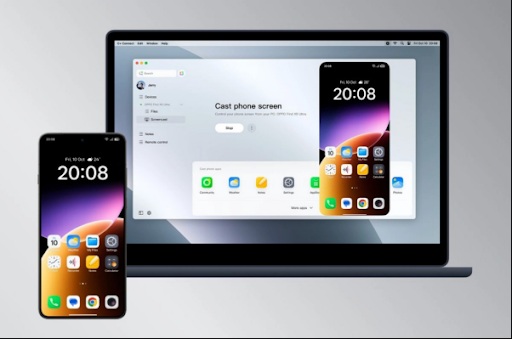
PC Connect mirrors the OPPO Find X9 Ultra directly to a MacBook, turning the laptop’s keyboard and trackpad into control inputs for the phone. Phone applications open on the MacBook display. Text input, navigation, file access, and app interaction all run through the laptop’s input system without switching physically between devices.
In a fast-paced office environment, the time saved by this seamless device integration quickly adds up. A professional managing WhatsApp Business communications, reviewing phone notifications, approving mobile banking transactions, and accessing phone-specific apps while working on a MacBook no longer needs to pick the phone up, unlock it, navigate to the relevant app, and return to the laptop. The phone becomes a secondary function running within the laptop workflow, accessible through keyboard shortcuts without interrupting focus.
Connection requires the O+ Connect app and ColorOS 15.0 or later on the phone, plus macOS 10.14 or later on the MacBook. Setup is a one-time installation rather than a session-by-session process.
Quick Share: Cross-OS File Transfer Without the Friction
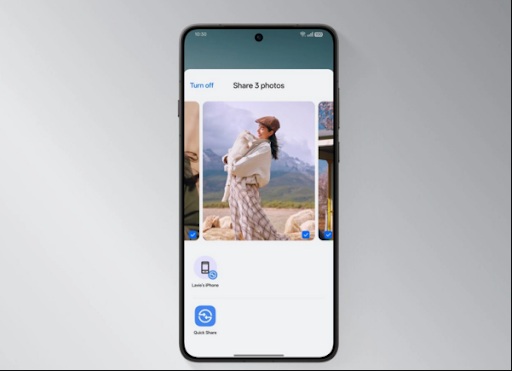
Quick Share on the OPPO Find X9 Ultra sends files between Android, iOS, iPadOS, and macOS devices without requiring an internet connection, working alongside AirDrop. Large presentation files, high-resolution images, video exports, and documents transfer between team members regardless of which ecosystem they’re using.
In creative environments that rely on a mix of Macs, PCs, Androids, and iPhones, having a reliable, offline way to transfer large files across different operating systems is a crucial workflow advantage. Corporate security policies often restrict uploading files to external cloud services from agency environments, which makes the local offline transfer pathway more relevant.
AI Writer: Drafting Without Starting From Zero
AI Writer takes rough inputs — bullet points from a meeting, a basic prompt, a fragment of notes — and structures them into drafts, professional emails, mind maps, or formatted tables. When drafting documents in multiple languages, AI Writer takes care of the initial outlining and formatting, making the writing process much smoother and more efficient.
The mind map conversion is useful for complex project presentations: a disorganized set of meeting notes gets converted into a mapped structure showing relationships between concepts, which provides a framework for the actual presentation without requiring manual outlining.
AI Mind Space: The Snap Key as a Work Tool
The Snap Key on the Find X9 Ultra activates AI Mind Space with a single press from any state of the device. During client calls, site visits, and brief corridor conversations, pressing the key captures voice notes, photos of reference materials, and text snippets into an automatically tagged and searchable archive. Over a working week in Milan, the accumulated captures form an organized record of decisions, action items, and reference information that would otherwise be scattered across a notes app, a browser bookmark folder, and a series of half-remembered mental notes.
Private Computing Cloud
Corporate and client-confidential data processed through the OPPO Find X9 Ultra’s AI features stays within a secure computing environment rather than being routed through general cloud infrastructure. When dealing with sensitive client information, such as financial records or unreleased designs, this localized processing ensures genuine data privacy rather than just a superficial security promise.
Snapdragon 8 Elite Gen 5 and Trinity Engine
The Snapdragon 8 Elite Gen 5, with 20% faster CPU, 23% faster GPU, and 37% faster NPU compared to its predecessor, handles sustained multitasking — parallel apps, 4K video calls, document editing, and background sync — without the performance degradation that affects less capable hardware after extended heavy use. The Trinity Engine manages resource allocation to maintain performance consistency.
For Milan professionals who use phones as genuine productivity tools alongside their laptops, the sustained performance under heavy multitasking matters more than peak benchmark figures. The 7050mAh battery handles a full working day including heavy use, with 100W SUPERVOOC wired charging available for the lunch break top-up.
Where This Positions Against the Find X9s
The OPPO Find X9s carries the same ColorOS AI tools (AI Writer, AI Mind Space, Quick Share) and the same PC Connect capability. The Find X9 Ultra steps up with the Snapdragon 8 Elite Gen 5 for heavier workloads, 50W wireless charging for desk setups, and a premium design that fits perfectly into any high-end corporate or creative setting.
 A snapshot of the UK rubber seals industry
 New White Paper: Multi-carrier shipping critical for unprecedented peak season capacity
 Choosing the Right Cable Railing System for Safety and Style
 Krone helps Southern Van Lines gear up for festival season
 Combatting the effects of strike action on the supply chain
 BITO to demonstrate innovative storage & picking at MACH 2024