

Every parent knows the frustration: you buy a sleek, transparent case for your child’s iPad, and within weeks it turns an unsightly shade of yellow. Beyond the cosmetic disappointment, that degraded case often signals weakening protection right when your child’s rough handling demands the most from it. With iPads serving as essential learning companions and entertainment hubs for kids, the anxiety over a cracked screen or dented corner is real—and expensive. A single repair can cost hundreds of dollars, not to mention the disruption to your child’s routine.
Anti-yellowing iPad mini cases represent a breakthrough in protective technology, combining advanced UV-resistant materials with the durability needed to withstand drops, spills, and sticky fingers. These cases maintain their crystal-clear appearance month after month while delivering superior impact protection and effortless installation. In this article, we’ll explore how anti-yellowing technology works, the essential features parents should look for, a step-by-step installation guide for a perfect bubble-free fit, and the long-term benefits of investing in premium protection for your child’s device.
The Importance of Protecting Your Child’s iPad Mini
iPads have become indispensable in modern childhood education, serving as interactive classrooms where kids access reading apps, math games, and creative tools that make learning engaging. Yet these powerful devices face constant threats in small hands—tumbling off couches, sliding across kitchen tables, or enduring juice spills during snack time. The everyday chaos of childhood means an unprotected iPad Mini is always one moment away from a cracked screen or damaged housing. Repair costs frequently exceed two hundred dollars, and the weeks without a device can disrupt homework routines and beloved bedtime stories. Beyond finances, there’s the emotional toll: children lose access to familiar learning environments, and parents feel the guilt of not preventing the damage. Reliable physical protection isn’t optional—it’s the foundation that keeps your child’s digital learning and entertainment uninterrupted, day after day.
Understanding Anti-Yellowing Technology in iPad Cases
Traditional transparent cases yellow because of a chemical process called photo-oxidation. When standard TPU or silicone materials absorb ultraviolet light from sunlight or even indoor fluorescent bulbs, their molecular chains break down and produce chromophores—compounds that absorb blue light and reflect yellow wavelengths. Heat accelerates this degradation, as does exposure to natural skin oils and sweat from small hands constantly gripping the case. Over three to six months, a once-clear case becomes dingy and brittle, losing both its visual appeal and structural integrity.
Anti-yellowing technology combats this through engineered polymer formulations that incorporate UV stabilizers and hindered amine light stabilizers (HALS) directly into the material matrix. These additives intercept free radicals before they can trigger oxidation chains, effectively neutralizing the yellowing process at a molecular level. Some premium cases also use aromatic-free polyurethane blends that resist discoloration far longer than conventional alternatives. The result is a case that stays optically clear for well over a year of daily use, even under harsh lighting conditions. Beyond aesthetics, this material stability means the case retains its shock-absorbing flexibility and protective strength throughout its lifespan. For parents, this translates to a case that looks clean and hygienic—important when kids press devices against their faces—while continuing to deliver the impact resistance your child’s iPad demands through countless drops and tumbles.
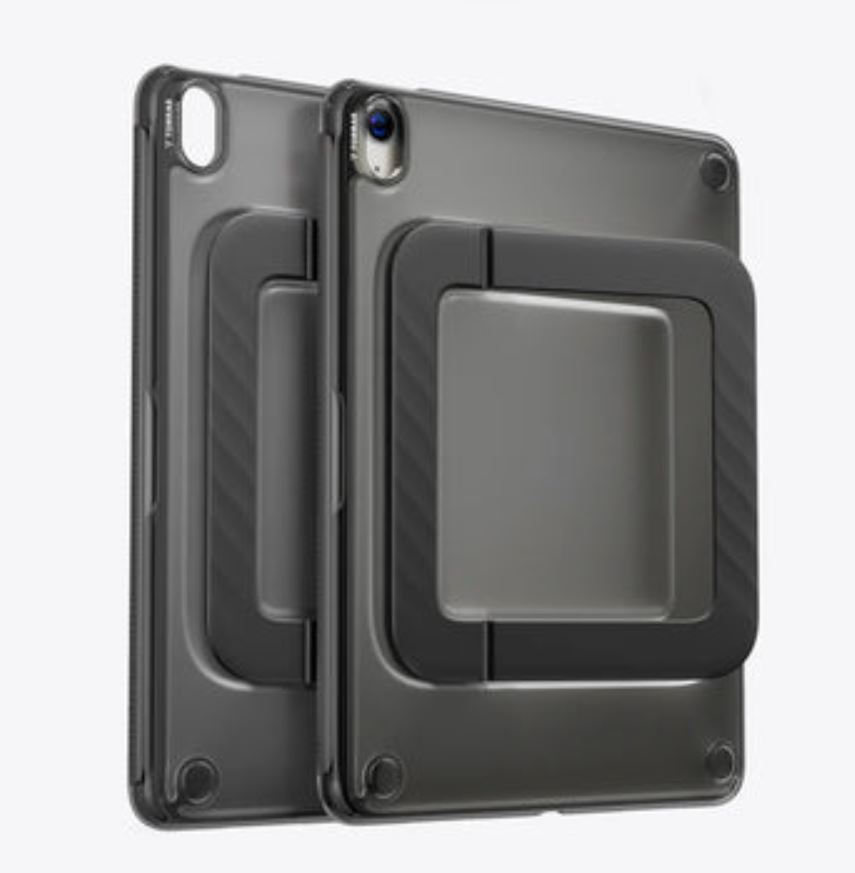
Essential Features of a Premium Anti-Yellowing iPad Mini Case
Not all anti-yellowing cases deliver equal protection. When shopping for your child’s iPad Mini, understanding the features that separate premium options from mediocre ones helps you make a confident choice. The best cases combine material innovation with thoughtful design elements that serve both parent and child in daily use.
Advanced Material Science for Enhanced Durability
Premium cases use hybrid constructions—typically a rigid polycarbonate back panel fused with flexible TPU bumper edges—infused with anti-yellowing stabilizers throughout. This combination absorbs shock from drops onto hard floors while resisting scratches from keys, toys, and backpack abrasion. The engineered flexibility means the case won’t crack or split at stress points even after months of bending during removal and reinstallation, giving parents a protective solution that genuinely lasts through a full school year and beyond.
Optimal Light Transmission for Clear Screen Visibility
High-quality anti-yellowing cases maintain over ninety-five percent light transmission through their transparent surfaces, ensuring your child sees vibrant colors and sharp text without squinting. This optical clarity reduces eye strain during extended reading sessions or video lessons, which matters especially for developing eyes. The non-yellowing formula preserves this transparency long-term, so the case never dims or distorts the display.
User-Friendly Design for Easy Handling and Installation
Look for precise cutouts that provide unobstructed access to charging ports, speakers, and buttons without forcing small fingers to dig into tight spaces. A slim, lightweight profile keeps the iPad easy for children to hold during reading, while textured edges add grip security. Snap-on designs let parents install or remove the case in seconds—no tools, no frustration, and no risk of scratching the device during the process.
A Parent’s Guide to Choosing the Best Anti-Yellowing Case
Selecting the right anti-yellowing ipad mini case requires looking beyond marketing claims and evaluating tangible protection criteria. Start with drop-test ratings—reputable manufacturers specify the height their cases can withstand, typically ranging from four to ten feet. For children under eight, prioritize cases tested at the higher end since drops from standing height onto tile or concrete are inevitable. Verify compatibility with your specific iPad Mini generation, as even slight dimensional differences between models can leave ports blocked or corners exposed.
Check whether the case works seamlessly with screen protectors, since combining both layers creates comprehensive defense without adding excessive bulk. Child-friendly design elements matter too—cases with slightly raised bezels protect the screen when placed face-down, while rounded edges prevent discomfort during long holding sessions. Some options come in translucent tinted colors that appeal to kids while still showcasing the iPad’s original design underneath. Brands like TORRAS have become well-known for their anti-yellowing material technology, originally developed for phone cases and now applied across their protective accessory lineup.
To verify anti-yellowing claims, look for specific mentions of UV stabilizers, HALS technology, or aromatic-free polyurethane in product descriptions. Read reviews from parents who’ve owned the case for six months or longer—short-term reviews rarely reveal yellowing performance. Photos in reviews are particularly telling. Finally, balance protection level with weight: a case that’s too heavy discourages children from using their iPad independently, undermining the very learning experiences you’re trying to protect.
Easy Installation: Step-by-Step Guide for Bubble-Free Application
One of the biggest frustrations parents face with iPad cases is improper installation that leaves air bubbles trapped beneath screen protector layers or creates gaps where dust accumulates. A poorly fitted case can actually cause more harm than good—shifting during drops instead of absorbing impact, or trapping debris that scratches the device surface. The good news is that premium anti-yellowing cases are engineered for straightforward application, and following a systematic approach ensures flawless results every time.
Preparing Your iPad Mini and Workspace
Begin by powering off the iPad Mini and selecting a clean, well-lit workspace—a kitchen counter wiped down with a damp cloth works perfectly. Use a microfiber cloth to thoroughly wipe the iPad’s back panel, edges, and camera area, removing fingerprints, dust, and any residue from a previous case. Pay special attention to the corners where grime tends to collect. If your case includes an integrated screen protector component, clean the display using gentle circular motions until no streaks remain. Avoid paper towels, which shed fibers that become trapped during installation. Having everything spotless before you start eliminates the primary cause of bubbles and imperfections.
Step-by-Step Case Installation Process
Hold the case open with the interior facing up and position your iPad Mini above it, aligning the camera cutout first as your reference point. Gently lower one edge of the iPad into the corresponding side of the case, pressing until you hear or feel a soft click. Then work around the remaining edges, pressing the flexible bumper over each corner sequentially rather than forcing all sides simultaneously. Once fully seated, run your finger along the entire perimeter to confirm every clip is engaged. Test each button and port access to verify nothing is obstructed or misaligned.
Tips for Avoiding Bubbles and Ensuring a Perfect Fit
If your case includes a back film layer, peel the protective liner starting from one corner and lay it down gradually, using a credit card or the flat edge of a microfiber cloth to smooth the material toward the opposite edge as you go. Work slowly—rushing introduces air pockets. Should a bubble appear, lift the nearest edge gently and re-smooth from that point outward. For stubborn air pockets, a small piece of tape pressed onto the bubble and lifted can release trapped air without leaving marks. If the case feels loose at any corner, remove it entirely and reinstall rather than forcing a misaligned fit that compromises protection.
Long-Term Benefits of Using an Anti-Yellowing Case
Investing in an anti-yellowing case pays dividends well beyond the initial purchase. Your child’s iPad maintains its like-new appearance throughout its usable life, which preserves resale value when you’re ready to upgrade to a newer model. Because the case material retains its structural integrity instead of becoming brittle over time, you avoid the cycle of replacing cheap cases every few months—a pattern that ultimately costs more than one quality purchase. Parents gain genuine peace of mind knowing the device stays protected through an entire school year without performance degradation. The consistent shock absorption means fewer repair bills, fewer disruptions to your child’s learning schedule, and less electronic waste heading to landfills. Over two to three years of ownership, a single premium anti-yellowing case can save families significant money while keeping the iPad functioning reliably as the educational tool it was meant to be.
Safeguard Your Child’s Learning with Lasting iPad Protection
Protecting your child’s iPad Mini isn’t just about preventing cosmetic damage—it’s about safeguarding an essential learning tool that supports their education and creativity every day. Anti-yellowing technology represents a genuine advancement in case design, using UV stabilizers and engineered polymer formulations to maintain crystal-clear transparency and structural strength long after conventional cases have turned brittle and discolored. The essential features we’ve explored—hybrid material construction, high light transmission, and user-friendly snap-on designs—work together to deliver protection that children and parents can rely on through countless drops, spills, and adventures. With the step-by-step installation guide, achieving a bubble-free, perfectly fitted application takes just minutes and ensures maximum protective performance from day one. Rather than cycling through cheap cases that fail within months, investing in a premium anti-yellowing iPad Mini case offers lasting peace of mind, meaningful cost savings, and uninterrupted access to the digital learning experiences your child depends on. Take the time to evaluate your options carefully, verify anti-yellowing claims through long-term reviews, and choose a case that truly matches your family’s needs—your child’s iPad and your wallet will thank you.
 Digital ID Management: Why the World Needs the LEI
 Leveraging Mobile Voice Recognition Technology to Safeguard Mental Health Services
 Microsoft Data Breach – what organisations can do to protect against this type of threat
 UK organisations risk operational disruption from cyberattacks as data backup is placed on backburner
 Shipping Smarter: How Carbon-Aware Routing is Saving the Planet
 The Role of Data in Today’s Digital Age