

Remote desktop software has become a vital part of modern computing, allowing users to access their computers from virtually anywhere. It is useful for remote work, managing files, offering technical support, and accessing a personal PC while traveling. The right software depends on performance, compatibility, security, and ease of use.
When comparing StarDesk and Moonlight, it is important to recognize that the two platforms are built with different purposes in mind, making them suitable for different types of users.
Understanding the Purpose of Each Platform
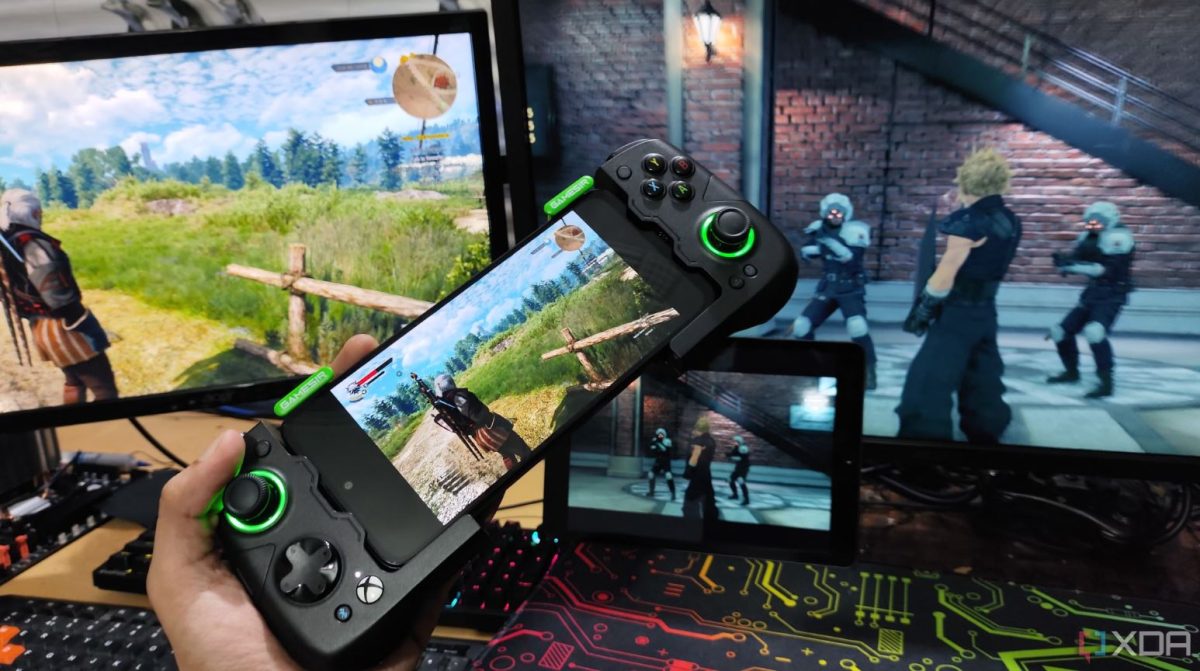
The comparison between StarDesk vs Moonlight starts with their main functions. Moonlight is an open-source application that is based on NVIDIA GameStream technology. It is primarily designed for low-latency game streaming from compatible PCs to other devices, making it popular among users who want to play games remotely.
StarDesk, on the other hand, is a remote desktop solution intended for accessing computers for regular tasks such as remote work, file management, technical support, and general desktop control. Depending on network conditions and system capabilities, it may also handle other remote access tasks. Because these platforms have different design goals, the better choice depends on how the software will be used.
Performance Considerations
Performance is one of the most important factors when choosing remote access software. Moonlight is well-regarded for delivering responsive streaming when used with compatible hardware and a stable network. It is designed to reduce latency during interactive sessions.
General-purpose remote desktop platforms focus on reliable desktop control, application access, and secure remote connectivity. Performance can vary based on internet speed, network quality, hardware specifications, and the distance between connected devices. Users should evaluate real-world performance based on their own environment rather than relying only on technical specifications.
Features to Compare
When comparing remote desktop platforms, several features are worth considering:
- Remote computer access
- File transfer capabilities
- Support for multiple monitors
- Clipboard synchronization
- Audio redirection
- Cross-platform compatibility
- Encrypted communication
The availability of these features may differ between applications and operating systems, so it is recommended to review the current software documentation before making a decision.
Security and Privacy
Security is a crucial aspect of any remote connection. Most modern remote desktop applications use encrypted communication to protect transmitted data.
Users should also follow basic security practices, including:
- Using strong passwords
- Keeping software updated
- Enabling multi-factor authentication when available
- Restricting access to trusted devices
- Avoiding unsecured public Wi-Fi for sensitive connections
Good security habits are just as important as the software itself.
Ease of Installation
Installation is another consideration, especially for users with limited technical knowledge. Many remote desktop applications offer guided installation processes and simplified account setup.
Users interested in trying a general-purpose remote desktop solution can download StarDesk remote from its official website and check its compatibility with their operating systems and devices before use. Testing the software in the intended network environment is often the best way to determine if it meets individual needs.
Which One Is Better?
There is no single best option in the StarDesk vs Moonlight comparison, as both applications cater to different audiences. Moonlight is usually chosen by users interested in remote game streaming with compatible hardware, while StarDesk is designed for broader remote desktop access and everyday computer management.
Instead of asking which platform is objectively better, users should consider the following:
- Primary purpose
- Device compatibility
- Network environment
- Security requirements
- Ease of setup
- Long-term usage needs
Matching the software to the intended workflow typically results in a better overall experience.
FAQs
- What is the main difference between StarDesk and Moonlight?
Moonlight primarily focuses on game streaming, while StarDesk is designed for general remote desktop access.
- Can both platforms be used over the internet?
Yes, although performance depends on network quality, internet speed, and configuration.
- Which software is better for office work?
General remote desktop platforms are typically better suited for productivity and office-related tasks.
- What factors should I compare before choosing remote desktop software?
Consider compatibility, security, performance, supported features, ease of setup, and your intended use case.
Conclusion
Choosing between StarDesk and Moonlight largely depends on how remote access will be used. While Moonlight focuses on responsive game streaming, StarDesk is intended for more general remote desktop applications such as remote work, file access, and computer management. Understanding the strengths, limitations, and intended use cases of each platform allows users to make informed decisions based on their own computing needs rather than marketing claims.
 Empowering Human-Centric Digital Transformation Through AI
 Returns Pose a Significant Challenge for U.S. Retailers, According to Recent Blue Yonder Survey
 DLRT SECURES LEADING FINANCIAL SERVICES SUPPLIER QUALIFICATION
 Orbus Software Accelerates with 56% SaaS Platform Growth
 Top Moderation Platforms for In-Game Chat and Discord Servers in 2026
 10% of manufacturers have no contingency plans in place for Brexit