

Most restaurant operators don’t realize how much the wrong Restaurant POS Systems cost them until service breaks down mid-rush. Between steep hardware costs, spotty internet disrupting transactions at peak hours, and the headache of connecting delivery apps with accounting tools, the technology stack alone can become a full-time job. After reviewing dozens of platforms built for food service, three stood out for actually solving these problems rather than adding to them. This guide breaks down each one so you can make a smarter call before 2026.
The shortlist methodology
Every pick here came from public information: review platform ratings, published case studies, feature breakdowns from official websites, and real operator feedback from industry directories. Only platforms with a verifiable track record inside food service technology made the cut.
Why the Right Restaurant POS Systems Make a Difference
Picking the wrong system doesn’t just slow things down. It quietly drains revenue through every shift. Small and independent restaurants feel this especially hard, because upfront hardware and software costs can hit before a single transaction is processed. Then there’s the reliability question: a system that drops offline during Friday dinner service doesn’t just create frustration, it costs real money. The platforms that hold up are the ones built with food service in mind, where faster average transaction processing times, higher system reliability, and measurable table turn rate improvements aren’t just features on a sales page. They’re the actual difference between a smooth service and an operator losing sleep.
Top 3 Restaurant POS Systems: Specs at a Glance
Note: All data in this table is sourced from review platforms and the official websites of the listed companies.
| Company Name | Headquartered In |
| Orders.co | Los Angeles, CA |
| Toast | Boston, MS |
| Smart Tab | San Francisco, CA |
1. Orders.co
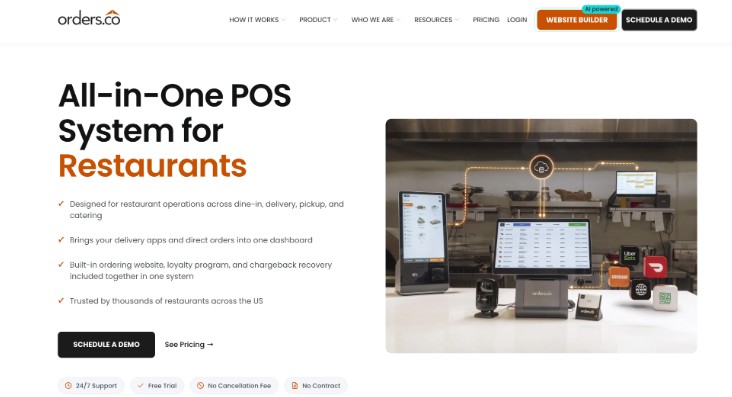
What Business Functions Does Orders.co perform?
Orders.co is an all-in-one restaurant POS system. It brings in-store ordering, payments, online ordering, third-party delivery apps, kitchen operations, delivery management, customer engagement, and reporting together in one system. Dine-in, phone, direct website, DoorDash, Uber Eats, Grubhub, and ezCater orders all flow into the same POS environment, so staff handle every order from one place. Restaurants can manage menu items, pricing, modifiers, availability, and sold-out items centrally across connected channels. They also get a commission-free branded ordering website with pickup, delivery, scheduled ordering, coupons, loyalty and rewards, and guest review management. Multi-location groups can standardize menus, reporting, ordering, and workflows while keeping location-specific operational settings.
What Makes Orders.co Stand Out for Restaurant POS Systems?
Orders.co doesn’t treat the POS as just an order-taking and payment tool. It extends the POS across the whole restaurant operation:
- A KDS can be paired with the POS. KDS software is included with advanced plans; hardware is separate.
- Dine-In Express lets staff take orders at the table and send them through the POS to the kitchen.
- Each location can choose in-house delivery, AI Dispatch, or a specific third-party delivery provider.
- Uber Eats and DoorDash chargebacks are centralized. The Advanced service automatically initiates disputes after 24 hours and escalates rejected disputes by email and phone.
- Once coupons, loyalty rules, and popular items are set up, the system can automatically contact inactive customers every 11 days, with AI selecting the message or offer.
- Profit IQ connects sales with costs and expenses to give estimated profitability insights.
All of it is backed by 24/7 live support by phone, chat, and ticketing.
The Verdict from Users:
Customer feedback highlights the value of managing POS transactions, orders, menus, delivery channels, marketing, and loyalty in one system. Operators also point to the straightforward interface and automation. This is especially true for smaller restaurant teams that want to cut down the number of separate systems they have to manage.
2. Toast
What Business Functions Does Toast Perform?
Toast is an Android-based, all-in-one restaurant management system founded in 2011 out of Boston. The platform covers POS, online ordering, inventory, payroll, scheduling, and sales reporting under one roof. With over 200 integrations connecting it to major third-party apps and a built-in cellular fallback through Toast Router, it’s built to keep running even when internet goes sideways. Toast focuses entirely on restaurants (no retail, no other verticals), and that focus shows in how purpose-built the feature set feels.
What Makes Toast Stand Out for Restaurant POS Systems?
Toast addresses the fragmentation problem that plagues most restaurant tech stacks, where operators end up stitching together five different tools that barely talk to each other. Powering over 21% of U.S. restaurants as of mid-2024 and serving more of America’s top 100 highest-grossing concepts than any other POS, their real-world adoption signals something that demo calls usually can’t: operators actually stick with it.
The Verdict from Users:
Reviews consistently point to the depth of the ecosystem connections as a major reason restaurants stay on Toast long-term. Some operators flag that the pricing structure takes time to fully understand (think enterprise pricing tiers), but the tradeoff in reliability tends to win them over. High-volume operations tend to see the biggest return, based on what the data shows.
3. Smart Tab
What Business Functions Does Smart Tab Perform?
Smart Tab is a hybrid cloud POS built for bars, nightclubs, and breweries. Founded in 2011 and based in San Francisco, the platform runs on both local servers and cloud infrastructure, which means it keeps processing payments even when the internet goes down (a real concern in packed venues). Features like ID-based payment profiles, biometric employee tracking, custom table maps, and kitchen display systems are all designed for high-speed, high-volume environments. Their enterprise mode handles multi-location management for operators running more than one venue.
What Makes Smart Tab Stand Out for Restaurant POS Systems?
Where most POS systems treat bar operations as an afterthought, Smart Tab builds entirely around them. The team is made up of former bartenders, servers, general managers, and owners, and that shows in features like offline payment processing and ID-linked tabs that solve real nightlife headaches.
The Verdict from Users:
Operators running bars and nightclubs highlight the offline reliability as the standout benefit, especially during peak nights when a dropped connection would otherwise halt service. The month-to-month pricing model gets positive mentions too (not locked into a contract, which smaller venues appreciate). For any venue that lives and dies by Saturday night volume, Smart Tab’s focus on that exact environment is genuinely useful.
The Research Behind These Recommendations
Establishing the Data Foundation
The starting point was building a broad list of platforms actively serving the restaurant and food service technology space. Sources included well-known software directories, operator-facing review platforms, and published case studies from industry publications. The goal at this stage was breadth: cast a wide enough net to catch both the established names and the more specialized tools that serve specific venue types like bars, nightclubs, and fast-casual chains.
Which Candidates Advance to Next Steps
From that initial pool, platforms with limited public documentation, unverifiable feature claims, or thin review histories were cut early. What stayed were options with enough real-world operator feedback to draw meaningful patterns from. Review sentiment was analyzed not just for star ratings but for recurring themes: what operators praised consistently, what frustrated them, and whether complaints pointed to fixable issues or design gaps.
Cross-Referencing for Accuracy
Each remaining platform was then checked against multiple sources to make sure the claims on their official sites matched what operators were actually saying in reviews. Where a company’s marketing described certain capabilities, those descriptions were tested against case studies, forum discussions, and third-party platform listings. Discrepancies between marketed features and reported operator experience flagged a platform for closer scrutiny or removal.
Where Each Pick Stands in the Industry
Beyond user reviews, each company’s broader industry standing was assessed. This included looking at award recognition, mentions in food service and hospitality trade publications, and any documented adoption figures (like the publicly reported numbers for Toast). A platform with strong reviews but no presence in broader industry conversations carries a different weight than one that appears consistently across multiple credible sources.
Restaurant POS Systems-Specific Validation
The final check focused on food service relevance. Each platform was evaluated for dedicated service pages tied to restaurant and bar operations, verified reviews from restaurant operators (not generic small business owners), and case studies showing real results in food service environments. Platforms that served food service as one of many verticals were held to a higher bar than those built exclusively for it. The three companies that made the final list cleared every stage of this process.
User’s Guide: Choosing the Right Restaurant POS Systems
Before committing to any platform, it helps to get clear on what your operation actually needs day-to-day, because the right fit depends heavily on your venue type, volume, and existing tech setup. Here’s what to weigh:
- Industry and Domain Experience: Look for platforms built for food service, not adapted from retail or general-purpose tools. Teams with direct hospitality backgrounds tend to solve problems that others don’t even see.
- Features and Service Options: Match the feature set to your actual operation. A bar needs ID-linked tabs and offline processing. A multi-location restaurant group needs solid reporting and payroll tools. Don’t pay for features you won’t use.
- Pricing Structure: Watch for hidden costs in hardware, per-transaction fees, and add-on modules. Ask for a full breakdown before signing anything, and factor in training and setup time.
- Results Measurement: A good platform should give you clear visibility into average transaction processing time, table turn rates, and inventory shrinkage. If you can’t measure it, you can’t improve it.
- Industry Knowledge and Compliance: Make sure the platform handles PCI DSS and payment security compliance, tip reporting requirements, and any local tax regulations relevant to your area. These details matter more than most operators expect at the start.
What Matters Most
The right Restaurant POS Systems choice comes down to fit, not feature count. Toast works well for operators who need broad coverage and deep integrations across a full restaurant stack. Smart Tab is purpose-built for bars and nightlife venues where offline reliability matters most. Orders.co brings AI-driven automation to online ordering and customer engagement, especially for independent restaurants building repeat business. As food service technology keeps advancing, platforms that combine operational depth with smart automation will define how the best-run restaurants stay ahead.
 How Supply Chain Operators Use OKRs to Maintain Execution Under Constant Disruption
 Understanding the Benefits of Thought Field Therapy
 How Car Key Programming Improves Vehicle Security
 Creating sustainable value within Intralogistics
 Finding the ‘Just Right’ Cloud Solution Through MSP Partnership
 Vehicle Battery Market Awaits Upbeat Growth Prospects, Battery Technology to Remain Instrumental: New Study