

Supply-chain attacks aren’t conference folklore anymore—they’re today’s reality. Verizon’s 2025 Data Breach Investigations Report shows that 32 percent of breaches now begin with a supplier, doubling last year’s share.
From Target’s 40 million skimmed cards to SolarWinds, one shaky link can sink an entire fleet.
You remain on the hook. New mandates—U.S. Secure Software EO and the EU’s NIS2—make third-party risk your problem, full stop.
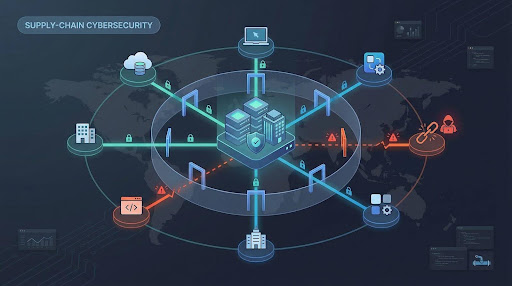
So we tested dozens of platforms and chose eight that cut exposure right now across access control, code hygiene, pipeline hardening, artifact integrity, and vendor monitoring.
Let’s slam the door on attackers.
How we picked these eight tools
Before we reveal the lineup, here’s how we built the shortlist. Our team interviewed frontline security engineers, combed through Reddit war stories, and dissected breach post-mortems—not vendor slide decks.
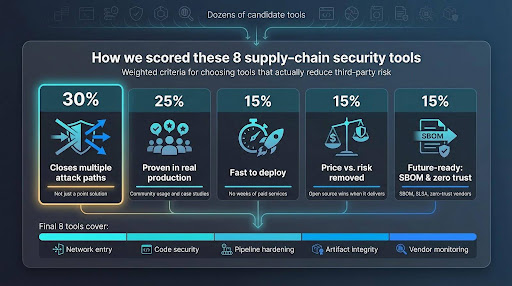
Each candidate faced five pass-fail questions:
- Does it close more than one supply-chain attack path?
Point solutions that cover a single niche never lead the pack. - Is the community running it in production today?
Stars, case studies, and peer reviews weigh more than marketing copy. - Can your team deploy it without weeks of paid services?
If setup feels like free labor, the score drops. - Is the price in line with the risk it removes?
Open source wins when it delivers; paid platforms must prove clear ROI. - Is it built for the future—SBOM, SLSA, zero-trust vendor access?
Nobody wants software that looks dated the day the purchase order is signed.
We scored the answers 30, 25, 15, 15, and 15 percent, then ranked the results. The final eight cover network entry, code security, pipeline hardening, artifact integrity, and vendor monitoring—a balanced chain that fails only if one link is weak.
With the scoring settled, let’s meet tool number one.
1. TorGuard dedicated IP VPN: give every vendor one safe door in
Remember the Target hack: attackers grabbed a heating contractor’s VPN password, strolled through an open network, and skimmed 40 million credit card numbers. If anyone can wander through your lobby, code security hardly matters.
TorGuard closes that lobby quickly. Instead of generic VPN profiles, you issue each partner a single static IP address. Your firewall whitelists that lone address and drops every other connection attempt. A stolen credential is useless unless the thief also controls that exact IP.
Setup stays light, and the unique address sidesteps the captcha challenges and website blocks that shared VPN IPs trigger.
Vendors install the TorGuard VPN client, choose the dedicated endpoint, and connect. No hardware to rack, no tunnels to stitch. Spin up an IP for a short project, then delete it when the work ends. Access disappears with a toggle, not an IT ticket.

TorGuard dedicated IP VPN vendor access product page screenshot
Costs stay modest because TorGuard grew out of the consumer VPN market. Two dedicated IPs often cost less than one developer seat in a typical SCA suite, a win for midsize teams that rely on freelancers or managed-service providers.
TorGuard encrypts traffic and locks access to an address, but it doesn’t capture detailed session logs or enforce device posture. Enterprises that need per-user analytics or malware inspection can layer a zero-trust gateway on top. For many teams, though, TorGuard is the fastest way to shrink an attack surface while longer-term projects mature.
If your vendors still tunnel in from cafés and home routers, start here. One door, one key, one IP. Attackers hate those odds.
2. Snyk: scan every line of open source before it scans you
Modern apps borrow more code than they write, expanding the attack surface to code you did not create. Snyk turns that risk into a daily hygiene check rather than a weekly fire drill.
The service connects to GitHub, GitLab, or Bitbucket. Seconds after a developer opens a pull request, Snyk scans every dependency, container layer, and infrastructure template. If a package pulls in a critical CVE, Snyk flags it, suggests a safer version, and can even raise an automatic fix PR. Your team keeps shipping while security debt stays low.
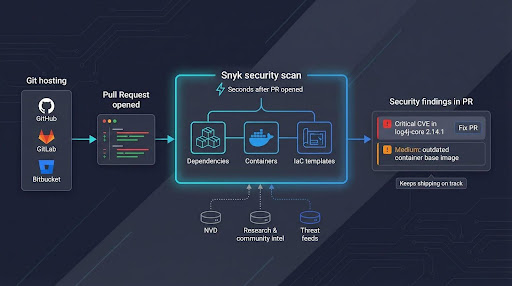
Snyk’s vulnerability database powers those quick alerts. It blends community intel, proprietary research, and National Vulnerability Database feeds so notifications arrive within hours of disclosure. During the Log4Shell scramble, users with Snyk in their pipelines received actionable guidance while many rivals were still updating signatures.
Pricing grows by developer seat, which can push larger teams to prioritise key projects. The free tier, however, shields public repositories and proves value quickly. For command-line devotees, Snyk’s CLI and IDE plug-ins keep security inside the developer workflow.
Expect some noise until you tune severity thresholds, and note that Snyk does not analyse proprietary code paths the way a full static-analysis engine does. Pair it with SAST if business-logic flaws top your worry list.
If “audit open-source licenses” or “generate an SBOM” still sits on your backlog, start here. Snyk fixes the third-party code problem at the speed your developers already move, removing the low-hanging fruit attackers rely on.
3. Anchore: turn every container build into a real-time SBOM factory
Containers ship fast, and vulnerabilities follow. Anchore captures every ingredient automatically so you know what shipped before the next headline CVE appears.
The open-source engine, powered by the Syft and Grype projects, creates a complete Software Bill of Materials as soon as a Docker image lands in your registry. Names, versions, licenses, and checksums are stored in CycloneDX format without extra build steps. The same engine re-scans each image on a schedule, so a flaw disclosed tonight triggers an alert on yesterday’s release.
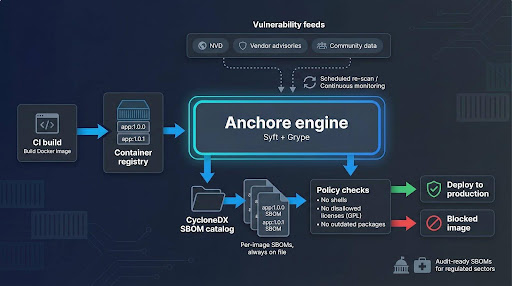
Policy gates keep surprises out of production. Block images that include shell access, GPL code, or outdated packages by writing a simple rule. Teams often start with the free CLI, then move to Anchore Enterprise for a visual dashboard, FedRAMP-ready reports, and role-based access controls. The upgrade is optional; core transparency remains free.
Regulated sectors benefit most. Government suppliers need SBOMs for every deliverable, and healthcare DevOps teams must prove container compliance during audits. With Anchore feeding a central catalog, finding Log4j across thousands of images becomes a thirty-second query instead of an all-hands scramble.
Running the engine yourself means maintaining a Postgres database and updating scanner feeds. Small serverless shops may prefer a hosted alternative. Anchore also focuses on what lives inside containers, not the application code itself, so pair it with Snyk or a SAST tool for full coverage.
If containers drive your release train, Anchore provides the manifest you need to respond quickly when the next vulnerability drops.
4. Sigstore with Cosign: prove your code on Friday matches what you built on Monday
Even a clean pipeline can betray you if attackers tamper with artifacts after the build server finishes. Traditional signing demands hardware tokens, private CAs, and complex ceremonies. Sigstore removes that friction.
Developers run one command, cosign sign, and the image, binary, or Helm chart leaves the build stamped with a cryptographic signature tied to their OIDC identity. The signature lands in a public transparency log, so anyone can verify it later without managing certificates or secret keys.
That transparency changes audit conversations. Instead of saying, “Trust us, we followed the checklist,” teams point auditors to a permanent ledger that shows who signed each release and when. Kubernetes admission controllers can block unsigned images at runtime, turning policy into an automatic gate rather than a PDF.
Open-source projects moved quickly: Kubernetes signs every official image, and several Linux distros now require Sigstore attestations for inbound packages. Internal teams follow because setup feels like adding another lint step—drop a GitHub Action, configure a policy, and proceed.
Sigstore is free and hosted by the Open Source Security Foundation. Highly regulated shops can self-host Fulcio and Rekor, though that adds services to maintain. Either way, the learning curve is gentle compared with classic PKI.
If you worry that a compromised CI runner could slip malware into tonight’s build, Sigstore is your safeguard. Signed artifacts plus mandatory verification make tampering visible, and attackers dislike leaving fingerprints.
5. Legit Security: map your CI/CD jungle and prune the hidden vines
You closed the front door with TorGuard, audited libraries with Snyk, catalogued containers through Anchore, and signed releases via Sigstore. What about the webhooks, service accounts, and scripts that shuttle code from commit to production? One weak link there lets attackers bypass every control you just added.
Legit Security exposes those blind spots. The SaaS platform connects to GitHub, GitLab, Jenkins, and cloud build systems, then draws a living blueprint of your entire delivery chain. Repositories, runners, artifact stores, deploy keys—each element appears on a single map, colour-coded by risk.
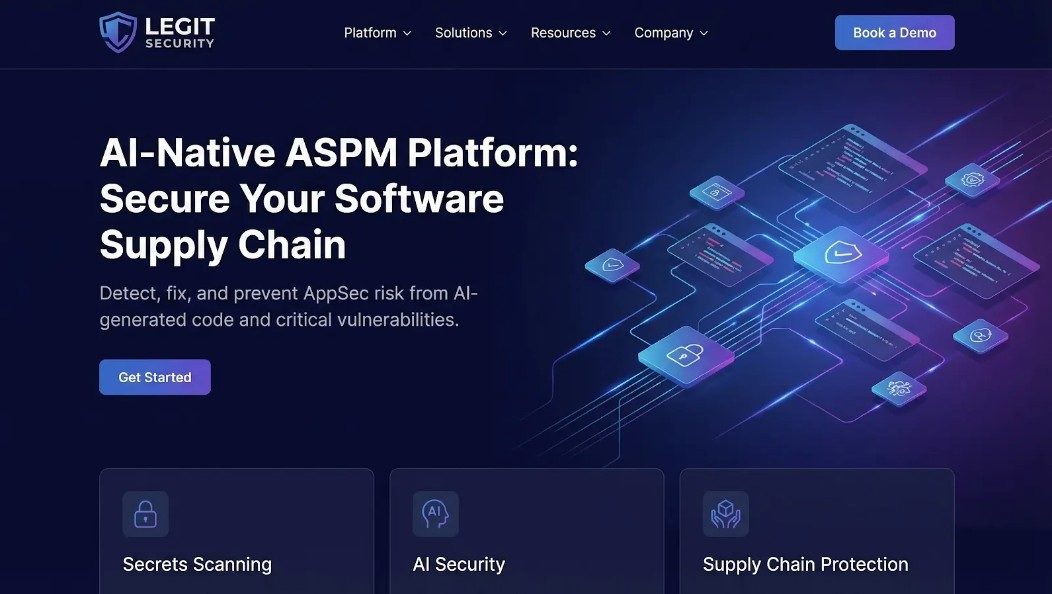
Legit Security CI/CD pipeline risk map dashboard screenshot
The first scan is often sobering. Orphaned access tokens sit next to public test repositories. An outdated TeamCity server nobody owns remains exposed on the internet. A staging cluster still allows default kube-admin logins because someone disabled RBAC “temporarily” last year. Legit scores each issue so you can fix the highest-impact gaps before the next sprint.
Setup is simple: grant read-only API permissions, and the dashboard fills itself in minutes. No agents to install, and because the tool reads metadata rather than source code, intellectual property stays private. Findings can flow into Jira or ServiceNow, turning risky settings into tracked remediation tasks instead of forgotten screenshots.
Pricing targets enterprises and scales by environment size, not seat count. Start-ups with a single repository may find the cost steep, but organisations running dozens of microservices and multiple CI platforms gain immediate visibility worth the spend.
Think of Legit as a continuous penetration test for your software factory. It spots weak vines before attackers swing through them, ensuring the pipeline stays as strong as the code it delivers.
6. Phylum: block malicious packages before they land in npm install
Most scanners chase published CVEs. Phylum looks for malicious intent. It dissects every new release on npm, PyPI, RubyGems, and other ecosystems, scoring each package for risky behaviour such as obfuscated code, unexpected network calls, or suspect maintainer history.
Speed matters. Attackers often publish a benign library, wait for stars, then push an update that steals credentials. Phylum flags that suspicious update the moment it hits the registry, so the build fails instead of production.
Implementation is simple: add a pre-install hook or CI step. When a developer pulls a dependency, the Phylum CLI scans it locally and checks cloud scores. If the package exceeds your threshold, the install aborts with a clear reason. Security teams choose to block, warn, or open a ticket.
False positives surface when benign libraries use compression or code-generation tools. Suppress findings by hash, and the signal-to-noise ratio improves as the model learns from feedback.
Pricing starts with a free tier for open-source projects and scales by monthly scans, making it attractive to JavaScript-heavy start-ups without a full threat-intel team. Enterprises can negotiate a site licence and feed results into a SIEM for correlation.
If Log4Shell taught us to know what we ship, recent supply-chain malware shows we must distrust every package at the gate. Phylum stands guard, turning “npm install” from a gamble into a controlled checkpoint.
7. OWASP Dependency-Track: keep a live inventory for the next CVE
Incident response is chaotic; clear visibility calms the room. Dependency-Track stores a live SBOM for every project and cross-checks it against new CVEs the moment they appear.
The workflow is simple. Your pipeline generates a CycloneDX SBOM with tools such as Syft, Maven, or Gradle, then posts it to Dependency-Track’s API. From that point forward, the platform handles the drudgery. Nightly feeds from the National Vulnerability Database, GitHub Security Advisories, and vendor lists flow in. When a new flaw surfaces, only the applications that contain the risky library light up red.
Security teams value the portfolio view. One dashboard shows total critical findings, age of each issue, and owning team. During the Log4Shell scramble, many users located every vulnerable JAR in minutes—a task that took competitors hours with spreadsheets.
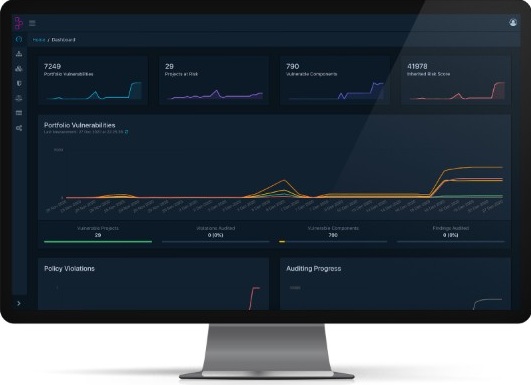
OWASP Dependency-Track portfolio dashboard for SBOM-based vulnerability tracking
Hosting is entirely under your control. A small Docker Compose stack manages thousands of SBOMs, and no data leaves your network, satisfying finance and healthcare privacy demands. The trade-off is routine container updates and database backups. Dependency-Track surfaces problems; it does not patch them, so pair it with Snyk or another automation tool for fixes.
When the next headline vulnerability breaks social media, you will not grep repositories; you will open Dependency-Track, filter by component name, and alert only the teams that need to act. Everyone else keeps shipping.
 Peak Covid-19 will see doubling of home deliveries as people avoid crowds, forecasts ParcelHero
 G.B. Agencies readies for Brexit with e-Customs solution from Descartes
 Recycle Revolution: How To Increase Recycling Rates With 2D Codes & The GS1 Digital Link
 COVID-19 recovery: Could the government help to fund your warehouse technology improvements?
 Shadow AI Is Your Biggest Ungoverned Attack Surface — Here’s How to Get It Under Control
 Egypt’s Ibnsina Pharma Drives Agility with Infor