
Most pages that stall on Facebook monetization didn’t fail at posting. They started posting before deciding where the traffic would go, who it was for, and how they’d measure it. Settle five things first and the rest of the work gets simpler.
This guide covers the route where followers move to a page you own and the ads live there, so every step stays inside your own publisher account.
The Five Decisions
Each one takes an afternoon at most, and each one saves weeks later.
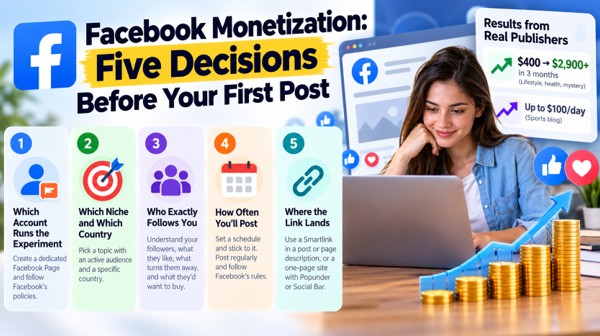
1. Which Account Runs the Experiment
Create a dedicated Facebook Page for your publishing activity. It helps keep your content, audience statistics, and posting schedule organized separately from your personal profile. Follow Facebook’s account and content policies from the start.
2. Which Niche and Which Country
Pick a topic with an audience that’s already moving. One publisher’s method is to look at what’s trending in a specific country, find why a name or story is trending, then search that name on Facebook to see the keywords around it. A narrower target also helps. Meng Sokseny aimed only at visitors from his home country, and Waseem Afzal went where cricket fans already gather, in groups about the sport.
3. Who Exactly Follows You
Write down four answers: what kind of followers you have, what content they like, what might push them away, and what they’d want to buy. Write down four answers: what kind of followers you have, what content they like, what might push them away, and what they’d want to buy. Use your Facebook Page insights to check audience demographics and engagement. Comments and reactions can also help you understand which topics interest your followers.
4. How Often You’ll Post
Set a schedule and stick to it. Regular posting, daily if you can manage it, keeps engagement steady, and a simple content plan means you’re never deciding at midnight what to share. Describe each link accurately, and follow Facebook’s rules and each group’s posting rules, since a misleading link puts the whole page at risk.
5. Where the Link Lands
This is where Facebook monetization becomes concrete. Smartlink, a publisher-only format, can sit in a post or page description with no website at all: copy it from your Adsterra dashboard and followers who tap it reach an ad offer. If you’d rather build a one-page site, add Popunder, which opens in a separate tab or window and takes no page space, or Social Bar, which shows notification-style units on the page.
What the Results Looked Like
Two publishers followed this route with different content. Both figures below are their own reports.
| Publisher | Content | Facebook route | Reported result |
| Meng Sokseny | Lifestyle, health, mystery | Several pages and groups, original and reposted material with his link, friends asked to comment and share | About $400 in January, over $2,900 three months later, using Social Bar |
| Waseem Afzal | Sports blog | Cricket groups, shared posts, active in discussions | Up to $100 a day, using Popunder and Social Bar |
Notice what they share. Each picked one niche, found where it already gathered on Facebook, and had a page ready to monetize the visit before posting the link.
How Rates and Payouts Work
Publishers can track eCPM in their accounts to see how much revenue their traffic generates per 1,000 ad impressions. eCPM varies depending on traffic quality, GEO, ad format, and advertiser demand. Traffic that performs well for advertisers may generate higher eCPM. Adsterra works with more than 45,000 publishers, pays twice a month, and lets you withdraw from a $5 balance with supported methods. Some publishers report daily earnings of $50 to $800 or more, though results vary.
FAQ
Do I need Facebook’s own programs for Facebook monetization?
Not for this route. A Smartlink or a one-page site with ad code runs through your publisher account, though every post still has to follow Facebook’s rules.
Can I start without a website?
Yes. Smartlink works from a post or page description, and a site can follow once traffic grows.
Why use a separate account for testing?
A dedicated Facebook Page helps you organize your content, track audience engagement, and keep publishing activity separate from your personal profile.
 Smarter Investing Starts with Smarter Data: How AI Is Reshaping Fund Management
 Command Alkon & HCSS Aligned in Promoting Safe & Productive Construction Operations Amidst COVID-19 Crisis
 Digital workers: the key to unlocking fully-optimised logistics
 Jungheinrich focuses on green electricity
 FreightTech 25 Awards Recognize FourKites Innovation for the Seventh Consecutive Year
 Why Supply Chain Digitalization Needs Cyber-Aware Teams