

To achieve a reliable self-service kiosk, you need to design the hardware from the ground up to deal with constant physical use, thermal stresses and easy access to components.
Getting it right is a matter of using commercial grade internal electronics and crafting a tidy wiring solution, not simply stuffing consumer tablets in customized metal boxes.
Rethinking Enclosure and Component Layout
The majority of kiosk projects fail because the team focuses on the outside of the kiosk before the internal subsystems and breathing elements are considered. Technicians fit power supplies, motherboards, receipt printers and payment terminals in confined sheet metal enclosures, where heat builds up quickly. That heat accumulation reduces the life of the backlights and processing units in the display, which leads to unplanned restarts at certain times of the day when there are the most transactions. It is always best to design component placement around obvious thermal convection paths, with intake fans close to cool lower vents and warm air venting out the top.
Accessibility of the components should be considered equally important when planning the layout of the components during the initial design phase. If a field tech must replace a broken touch controller or barcode scanner, then he shouldn’t have to unbolt three brackets. Modular swing out sub-panels or slide-out trays cut typical service time to 15 minutes.
Also, standardizing your main computing and interface boards and avoiding a mixture of off the shelf development cards from batch to batch is also worth considering. Early engagement with an experienced PCB Assembly Manufacturer means your central control boards come with industrial quality capacitors, conformal coatings, and guaranteed component revisions. Humidity changes and static discharge from end users tapping the acrylic screens all day are prevented with industrial fabrication.

Power Distribution and Harness Design
Kiosks with spaghetti wiring invite random hardware issues. Loose cables can easily be snagged by technicians working on an urgent repair, and can cause push-on terminals to loosen or pins in the delicate headers to become misaligned. An accidental disconnect is avoided by having all the internal DC power bundled in one unified custom electrical harness, which also simplifies assembly in the factory.
A properly designed harness will keep high current paths separated from low voltage signals. A common mistake is to run AC mains power lines in parallel with unshielded audio or sensor wires, as this will create electrical noise and result in a fake input on the touch screen. You can pin-out dedicated branch circuits using keyed, latching automotive or industrial connectors to prevent mistakes by field personnel or other users in plugging power feeds into the wrong ports.
In addition, proper power budgeting takes into consideration sudden peripheral current spikes. Thermal receipt printers and motorised card readers have high current in-rush during paper cutting and card ejection. Microsecond voltage drops can reset the operating system if the power bus is a single unregulated rail shared by the computer and peripherals. When peripherals fire at the same time, transactions don’t get affected by the resulting spike if you place your computing heart behind a controlled DC-DC stage or a small battery backup.
Preventing Intermittent Peripheral Disconnections
Field data indicates that most of the out of order problems with kiosks are caused by loose USB connectors and snapped data leads. Regular consumer grade patch cables are loose fitted, and over time, they creep out of their connectors due to the vibrations of cooling fans, heavy foot traffic and the heavy handed approach of users to their keyboards. A rugged custom cable assembly secures peripheral connections to keep all cameras, scanners, keypads in constant communication with the host board.
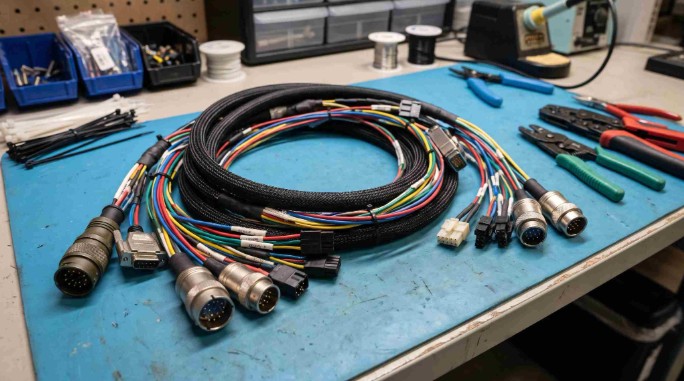
Custom assemblies enable you to select a precise cable length, right angle overmolds, and positive locking screw terminations. There is no extra slack in the chassis so data cables are not at risk of coming into contact with sharp edges on the chassis or of falling into the fan blades. It also mitigates electromagnetic interference, which can interfere with high-speed serial communications.
Another practical requirement that off-the-shelf patch cords don’t provide is strain relief. Flexed cabling repeatedly when internal hinged doors swing open during normal paper loading. Copper conductors fatigue and snap inside their insulation jackets (absent molded strain-relief boots and anchored tie points). Silicone or polyurethane flexible jackets for durable interconnects ensure signal integrity for hundreds of service openings.
Streamlining Production with Integrated Builds
Engineering and procurement teams can easily get overwhelmed with dozens of separate component suppliers for sheet metal components, touch sensors, controllers, and wiring. Fitment delays on the factory floor are largely caused by quality issues from run to run on the fabrication process. This friction is eliminated by transferring 100% of mechanical and electronic integration to a turnkey box build assembly partner in which manufacturing is consolidated under a single source of quality controls.
Within an ESD-safe facility, a dedicated manufacturing partner checks incoming raw materials, stuffs internal electronics, performs wiring routing and chassis closure. They can undertake automated functional testing to ensure that the touch sensitivity, payment readers and cooling profiles are in line with their specification before any unit is sent out. Having this type of quality control verification on the factory floor is better than your installation staff having to troubleshoot dead on arrival machines at the installation site.
Furthermore, consolidated manufacturing makes lifecycle management easier when electronic components are notified of end of life. An experienced build contractor can anticipate finding drop-in replacements for obsolete microcontrollers or displays that are qualified before production comes to a halt. That continuity eliminates the potential for expensive redesign iterations if you deploy your business in dozens of retail or transport points.
Simplifying Field Maintenance and Upgrades
During the kiosk’s lifespan, paper rolls will need to be changed and software updated regularly, even with the most robust kiosk. Intuitive access to services keeps equipment safe from being forced or incorrect levers being pulled by well-intentioned employees. Keyed access panels must provide easy access to consumable bays for store employees and provide protection via baffles for sensitive motherboards and payment processors.
Remote out of band management hardware allows engineering teams to diagnose system health without sending a van. Adding hardware level temperature sensors, fan tachometers and smart power strips lets you monitor environmental conditions and power cycle hung peripherals remotely. When your monitoring software flags a rising internal temperature trend, you can dispatch a technician to clear a clogged dust filter before the processor throttles.
Standardizing your mounting patterns internally also safeguards your investment against rapid technological churn. Payment terminals and contact less readers evolve every few years as financial regulations change. By using modular faceplates and adjustable mounting plates, you can swap in a new transaction terminal without replacing the entire front bezel or re-cutting sheet metal. Designing with future hardware transitions in mind ensures your kiosk continues delivering commercial value for years to come.
 The fight for Christmas shoppers is almost underway
 The Strait Becomes a Digital Minefield: How Ships Are Navigating a War of Invisible Signals
 How Businesses Can Ensure Compliance with Secure Hard Drive Destruction
 Bathroom and kitchen retailers’ returns policies give ParcelHero a sinking feeling
 7 Ways Data Analytics Can Help You Boost B2B Sales
 Webfleet launches Secure Truck Parking in collaboration with Bosch Logistics Operating System