

Creating a polished product ad is much easier than you imagine. Your product page can be enough to get started.
You do not need to film the item, write scripts, or learn professional editing software.
AI can collect useful information from a product URL and turn it into a short promotional video in minutes.
This guide explains how to create an ad from a product URL with Pollo AI. It also shows how to use this tool to make videos for Instagram, TikTok, Facebook, and other social platforms.
Why Use AI to Make Product Video Ads?
A URL-to-video tool offers several practical benefits.
Faster content production
A basic product video can be generated in minutes. This is helpful if you manage a large catalog or need to publish new ads regularly.
Lower production costs
You can create ads without cameras, actors, studios, or advanced editing software. Small businesses can test video advertising without a big budget.
More ad variations
AI makes it easier to create several versions of the same ad. You can test different hooks, benefits, calls to action, video lengths, or formats.
Simple platform adaptation
AI tools can help you create vertical and square versions for different social media channels.
Create a Product Ad with Pollo AI’s URL to Video Ads Generator
Pollo AI’s URL to Video Ads Generator is a useful option for turning a product page into a polished ad video. It can help you produce social media advertising content with less manual work. Here is a practical step-by-step process.
Step 1: Choose the right product page
Start with a complete and accurate product page. AI can only work with enough information available. If the description is unclear or the images are low quality, update them before generating the video.
Step 2: Add the URL to Pollo AI
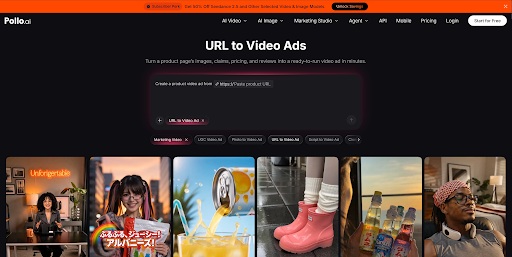
Open Pollo AI’s URL to Video AI tool and paste the product link into the input field.
The tool can analyze the page and use its text and visual content as the foundation of the video. Check the imported information before moving forward. Confirm that the correct images, product name, and selling points have been selected.
Step 3: Select a suitable video format
Choose the aspect ratio based on where you plan to publish the ad.
Common options include:
- 9:16 vertical: Instagram Reels, TikTok, YouTube Shorts, and Facebook Reels
- 1:1 square: Instagram Feed and Facebook Feed
- 16:9 horizontal: YouTube, websites, and presentations
For mobile-first social media advertising, a 9:16 video is the safest starting point.
Step 4: Generate and review the video
Generate the first version, then watch it from beginning to end. Check the following details:
- Is the product visible within the first three seconds?
- Is the text easy to read on a phone?
- Are the images sharp and correctly cropped?
Treat the first output as a draft. Small changes to the opening line, scene order, or text size can make the ad much stronger.
Step 5: Export and publish
Download the final video and upload it to your chosen platform. Add a useful caption, product link, and relevant hashtags where appropriate. For paid ads, follow the platform’s current advertising rules.
How to Make the Video Work on Different Platforms
Pollo AI’s URL to Video AI can be used to create product ad videos for Instagram, TikTok, Facebook, YouTube, and other channels. The core product message can stay the same, but each version should fit the platform.
Instagram Reels
Use an Instagram video maker to create vertical format, large captions, and a strong visual opening. Keep important text away from the top and bottom areas, where interface buttons may cover it.
TikTok
Use natural language and fast pacing. An ad that feels like a simple product demonstration often fits TikTok better than a formal commercial.
Clearly show the offer and product benefit. Since some users watch without sound, make sure the video still makes sense with captions alone.
YouTube Shorts
Deliver the main message quickly. Start with the result, problem, or most interesting feature instead of using a long brand introduction.
Practical Tips for Better AI Product Ads
Focus on one selling point
Do not try to explain every feature in a 15- or 30-second video. Create separate ads for separate benefits.
Put the product first
Avoid long logos or animated introductions. Show the item immediately so viewers know what the ad is about.
Write for silent viewing
Use short text overlays and captions. Many social media users watch videos with the sound turned off.
Create multiple hooks
Generate several openings for the same product. Examples include:
- “A simple way to organize a messy desk”
- “This travel bottle takes up less space”
- “Still cleaning your keyboard by hand?”
Test them to see which one holds attention.
Creating an ad from a product URL with AI is a practical way to produce more video content without a traditional production process. A clear product page, one strong benefit, and a direct call to action are often enough to build a useful first ad.
Pollo AI’s URL to Video AI makes this workflow straightforward. You can paste a product link, generate a video draft, adjust the message, and prepare versions for different platforms.
 Businesses must establish trust online in less than 10 minutes or risk losing customers
 Zizo Selected As One of STL Partners’ 2023 Edge Companies To Watch
 How Savvy Farm Startups Are Reducing Capital Expenditure Through Used Equipment
 Joloda Hydraroll launches first Powered Cargo Roller system that can be retrofitted to any standard trailer design
 High-density 4D storage solution maximises warehouse pallet capacity
 Columbus Consulting partners with GreyOrange for Innovative Store Platform