

If you’ve ever tried using USB devices over Remote Desktop, you’ve probably noticed something frustrating: some devices work perfectly, while others just refuse to cooperate.
On paper, RDP supports USB redirection. And in many cases, it actually works well. Plug in a flash drive, printer, or basic webcam, and everything behaves as expected. For everyday peripherals, you might never run into issues at all.
But things start to break down when you move beyond standard hardware. Security dongles, scanners, professional audio interfaces, and other specialized USB devices often behave unpredictably or don’t work at all. The problem isn’t always your setup — it’s how RDP handles different types of USB devices behind the scenes.
That’s where alternative approaches come in. Tools like USB Network Gate don’t rely on RDP’s built-in redirection and instead provide a different way to access USB devices remotely. They’re not meant to replace RDP entirely, but they can be a practical solution when native redirection falls short.
Why USB Redirection Fails in RDP
USB failures in RDP are often blamed on bandwidth or channel limits. That explanation is incomplete. The issue is architectural.
An RDP session multiplexes multiple subsystems, display, input, clipboard, printer mapping, audio, storage, and USB-related redirection, each using different transport and optimization paths.
USB behavior depends on how well a device fits those abstractions. A flash drive or keyboard maps cleanly to high-level redirection. The protocol understands the device class, encapsulates it appropriately, and the remote OS handles it transparently.
Specialized hardware does not behave the same way. A security dongle expects continuous presence, low latency, and precise driver interaction. Session reconnects, policy refreshes, or transient interruptions can break that expectation. The device remains physically connected, but the abstraction no longer satisfies the application.
In testing, native RDP worked reliably on LAN with stable sessions. Failures appeared consistently in three cases: vendor-specific dongles, TWAIN scanners where scanning failed but printing worked, and USB devices used over VPN sessions with reconnects. These are common scenarios in professional environments.
Where Native Redirection Fails First: By Device Type
Scanners and Multifunction Printers
This highlights RDP’s split behavior. Printing from the same MFP worked consistently because it uses high-level printer redirection.
Scanning is different. TWAIN workflows rely on vendor drivers and typically depend on lower-level USB handling. In practice, scanners often fail to appear or initialize in remote applications even when printing works. One device, two functions, different outcomes.
Audio Interfaces
Standard conferencing audio works well through RDP’s audio redirection. Professional USB audio interfaces, used by DAWs and dependent on stable timing and low latency, behave inconsistently under load.
This is the difference between application-optimized media redirection and true device-level expectations.
Hardware Security Dongles
For CAD, GIS, and industrial software, this is a critical failure point.
In testing, the dongle appeared in Device Manager but was not accepted by the application. After reconnecting, it sometimes disappeared entirely.
The issue is not detection, but behavior. RDP can expose the device but cannot always reproduce the timing and persistence required by licensing systems.
Webcams and Video Capture
RDP handles standard conferencing scenarios well, particularly with optimized applications.
Reliability drops in specialized capture workflows or with applications that are not RDP-aware. The same device can behave differently depending on the application, even within the same session.
Why USB Network Gate Is the Better Solution for USB Redirection
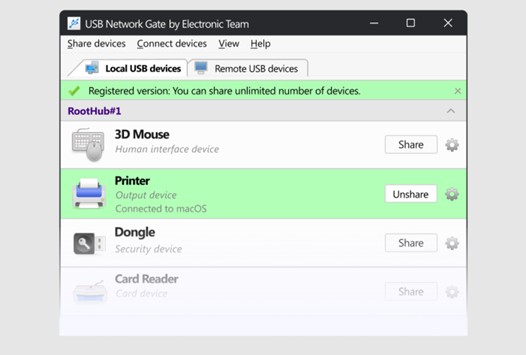
USB Network Gate (UNG) is one of the best alternative solutions for USB redirection when native RDP falls short. Instead of relying on RDP’s built-in mechanisms, it uses its own USB-over-network transport to expose remote USB devices to the target system. From the operating system’s perspective, the device behaves much like a locally attached USB device, rather than being translated through RDP’s abstraction layers.
This distinction becomes important for devices that depend heavily on drivers, timing, or persistent hardware interaction
Architectural Difference from RDP
RDP does not handle USB as a single unified system. It relies on a mix of high-level redirection (for devices like printers or storage) and lower-level mechanisms for certain USB peripherals. This means device behavior is translated into formats that RDP understands, which works well for standard hardware but introduces limitations for more specialized devices.
USB Network Gate avoids this translation layer entirely. USB communication is transmitted over the network independently of the RDP session, without depending on RDP channels or device models. In practical terms, RDP interprets device behavior, while USB Network Gate forwards it.
Because of this, UNG is not constrained by how well a device fits into RDP’s supported categories.
Compatibility with Specialized Devices
By bypassing RDP’s redirection stack, USB Network Gate often provides better results with devices that require consistent low-level interaction. This typically includes hardware security dongles, TWAIN-based scanners, industrial USB devices, and certain professional peripherals.
These are also the scenarios where native RDP redirection most often shows inconsistent behavior. That said, compatibility is not absolute. Outcomes still depend on the specific device, its drivers, and overall network quality.
Behavior in Real-World Network Conditions
One of the practical advantages of USB Network Gate is that it is not tightly bound to RDP session state. In environments where sessions reconnect frequently, such as over WAN or VPN, native RDP redirection can lose device state or behave unpredictably.
UNG tends to handle these scenarios more consistently because the USB connection is managed outside the RDP session itself. However, it is still subject to network latency and stability, and it does not fully replicate physical USB attachment in every case.
Deployment and Control
Deployment is straightforward. The software is installed on the machine that physically hosts the USB device, which is then shared over the network. A remote client connects to the device, and it appears to the operating system as a virtualized local USB device.
In multi-user environments, USB Network Gate also provides useful control mechanisms. Devices can be isolated per session or per user, and in most cases a USB device can only be actively used by one client at a time. This makes it suitable for Remote Desktop Services environments where controlled access to shared hardware is required.
Cross-Platform Use
USB Network Gate supports Windows, macOS, Linux, and Android, and allows devices to be shared across these platforms. This makes it practical in mixed environments where native RDP support may vary depending on the client system.
When to Use RDP vs USB Network Gate
Native RDP redirection should be the first option in stable LAN environments using standard peripherals. It is built-in, efficient, and sufficient for most common use cases where devices fit well within RDP’s abstraction model.
USB Network Gate becomes relevant when that model starts to break down. This typically happens with devices that depend on consistent driver-level interaction, such as hardware security dongles, scanning workflows that fail under RDP, or specialized USB hardware. It is also a practical choice in WAN or VPN scenarios where session reconnects can disrupt device state, as well as in environments where multiple users require controlled access to shared USB devices or where cross-platform support is needed.
These approaches are not mutually exclusive. In practice, RDP handles standard peripherals effectively, while USB Network Gate provides a more direct and often more reliable path for devices that RDP does not manage consistently.
 Hot vs. Cold: What’s The Best Crypto Wallet For You?
 Common Mistakes SaaS Marketing Agencies Help You Avoid
 Independent Research Determines CommerceHub Delivers 461% ROI
 Inside Advanced Manufacturing: The Growing Role of Ceramic and Cermet Coatings
 A spanner in the works: Addressing the VAT challenges for manufacturers embracing ecommerce
 Supermarket footfall on the rise