

An SOP video maker is the right purchase only if the next approved procedure change can be found, revised, reviewed, and republished without remaking the whole library.
First-cut speed is a weak buying test. The useful test is maintenance: who owns the next wording change, which scenes move, and how much work remains after the written SOP is already updated.
TapVid can turn an existing process document into a structured informational video and rerun the scene that changed. It does not replace the controlled written SOP. It also does not provide LMS packaging, SCORM export, completion tracking, or a compliance certificate. Those gaps matter. They should stay visible while you choose.
Operations and training teams usually already have the source. The decision is whether a video layer will stay aligned with that source after the first publish. If a tool can only prove a pretty first draft, it is not ready for a procedure that will move again next quarter.
Separate live demonstration from explainable steps
Not every SOP should become the same kind of video. Some steps exist only as a real action on a live system or a physical station. Other steps exist as a sequence, a decision, a record, or a handoff that people can follow from an approved document.
Split the procedure before you shortlist software.
-
- Must be shown live. Exact clicks, current field names, gauge readings, or a motion that only exists on the floor. A generated diagram is not proof of that action.
- Can be explained from the written SOP. Purpose, trigger, order, stop conditions, and the next owner. These belong in a structured informational video if the wording stays tied to the source.
- Must stay in the written SOP only. Rare exceptions, long tables, and specialist branches that would turn one video into a second uncontrolled manual.
If most of the value is in exact interface states, a screen recorder or a capture-based walkthrough is the honest first tool. If most of the value is in sequence, protected wording, and a later wording change, a document-to-video SOP video maker is in scope. Many teams need both. Buying one product to cover both jobs is how libraries go stale.
A documented TapVid test of the public Harborline Day-One Access SOP Explainer is reused here as first-cut evidence. The file is a first-party remake of a labeled fictional SOP, HL-OPS-ACCESS-001, published on TapVid’s owned onboarding examples page. This article did not generate a new Harborline run, and it did not apply a later procedure change. The brief asks for a 30-second, 16:9 employee-tools clip. It names five steps: open start.harborline.example, choose Request access, enter the work email from the offer letter, submit, then wait for Slack and email. The next action after the last frame is a buddy message: “Access is on.” The brief also locks protected lines and blocks invented click paths, teammate names, queue times, success rates, and security-policy steps from another document. That is a source-controlled explainer, not a live admin-console recording, and not a culture film.
The published remake shows that a written, labeled SOP can become a reviewable scene sequence. It does not prove that the generated screens are a real company system. It does not prove timing accuracy. It does not prove that a later wording change will leave the IT-queue caption alone. Human review still owns names, access paths, and anything that would grant a permission.
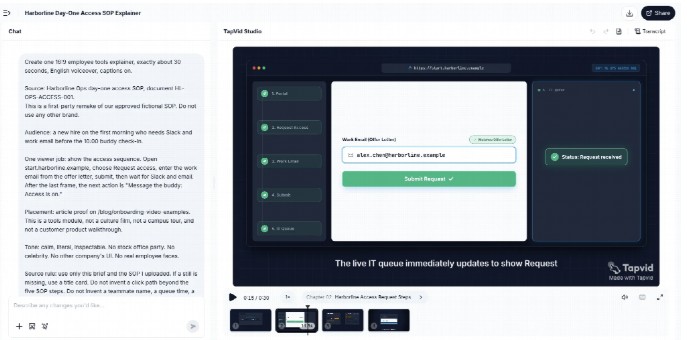
Figure: Reused published Harborline remake: the fictional HL-OPS-ACCESS-001 brief stays in chat while Chapter 02 shows the work-email and IT-queue scene. This is first-cut evidence, not a next-update result.
Mark the next change before you buy an SOP video maker
Do not start with a generic process taxonomy. Start with the scenes your current SOP already names. Write the next approved change as one sentence. Then mark what that change does to each scene you already have.
Use four marks only:
- Unchanged. The scene can stay. Protected lines must survive.
- Changes. New gate or new wording. This is the only place generation should reopen.
- Review only. The step still happens, but a human checks the adjacent wording.
- Out of scope. Park it as a later short clip. Do not fold it into the happy path.
Here is a labeled hypothetical built on the Harborline scenes the published remake already shows. It was not executed as a new generation for this article.
Hypothetical update: IT adds one gate before submit. The offer-letter email must use the company domain. If the domain does not match, the worker stops and asks the buddy instead of submitting.
Harborline scene already on file: Day-one start at start.harborline.example
- Mark: Unchanged
- Why this mark: The worker still begins at the same portal
Harborline scene already on file: Offer-letter domain gate and work-email line
- Mark: Changes
- Why this mark: This is the new gate and the new check copy
Harborline scene already on file: Submit or stop
- Mark: Review only
- Why this mark: Submit is no longer automatic
Harborline scene already on file: IT-queue status and buddy message
- Mark: Unchanged
- Why this mark: Protected lines stay unless the SOP rewrites them
Harborline scene already on file: Wrong-domain exception
- Mark: Out of scope
- Why this mark: A later short clip, not a silent extra beat in the first video
The buying question is narrower than a seven-step process map. Can the tool reopen only the domain-gate and work-email scenes, keep “The IT queue shows Request received” literal, and leave the buddy handoff in place? If one new label rebuilds the whole day-one clip, first-cut speed will not survive the next procedure update.
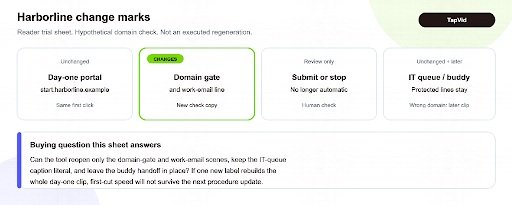
Figure: Reader trial sheet for a labeled hypothetical. The domain-check update was not generated. Fill the same four marks on your own SOP before you pay.
Vendor pages often say “update the script and regenerate.” That sentence is not enough. Regeneration can mean one scene or the whole file. Your marks make the difference visible before money is spent.
Assign review ownership before the first render
A stale SOP video is usually an ownership failure, not a rendering failure. The written SOP changed, or the live system changed, and nobody had a named job to retire the old file.
Assign four owners before you generate the first cut. One person may hold two roles in a small team. The roles still need separate checks.
Owner: Process owner
- Signs off: Step order, current practice, stop conditions
- Fails the video when: The video teaches a path the floor no longer uses
Owner: Wording owner
- Signs off: Protected lines against the written SOP
- Fails the video when: A caption or voiceover rewrites a required sentence
Owner: Visual owner
- Signs off: Screens, labels, and supplied stills
- Fails the video when: The picture shows a menu or status the system no longer has
Owner: Publisher
- Signs off: Version, SOP ID, and retirement of the old file
- Fails the video when: People can still open last quarter’s clip
These owners are not an LMS workflow. They are the minimum human path between an approved document and a file people will trust. Completion rates, quizzes, and SCORM packages are a different purchase. If you need those, buy or keep the system that already stores training records. Do not infer them from a video generator.
The published Harborline brief already behaves like a wording contract. It lists protected lines such as “Enter the work email printed on the offer letter” and “The IT queue shows Request received.” It also lists blocked claims. That is the review object. A process owner still has to confirm that the five-step order matches current practice. A visual owner still has to confirm that any supplied still matches the live portal. A publisher still has to keep the SOP ID on the file and remove the previous export from the place people actually click.
If a trial cannot show a script, a scene list, and a place to change one line before export, the review owners have nothing to sign. Do not compensate by adding more adjectives to the voiceover.
Score maintenance effort for one planned update
After the marks and the owners exist, score the work of one update. Use minutes you actually measure. Leave the score blank if you have not run the change.
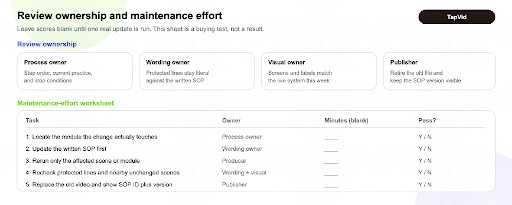
Figure: Ownership and effort stay on one page so a trial can be scored without inventing LMS results.
The worksheet has five tasks:
-
- Locate the scene the change actually touches.
- Update the written SOP first.
- Rerun only the affected scene.
- Recheck protected lines and nearby unchanged scenes.
- Replace the old video and show the SOP ID plus version.
A useful trial records, for each row: owner, minutes, and pass or fail. Do not average the rows into a marketing score. A tool that regenerates one scene in two minutes still fails if the publisher cannot retire the old file, or if the wording owner finds a rewritten protected line in an “unchanged” scene.
Official TapVid product pages describe the production side of rows 3 and 4. The explainer-generator page says approved names, numbers, and required wording stay literal, and that a later change can rerun the affected scene while the rest stays fixed. The tutorial-video page says specific steps can be updated while surrounding steps stay intact, and that version history can restore a prior step. The whiteboard page says a policy change should not rebuild the whole course, and it states the limit in the same breath: isolated revision is not a zero-error promise, so the new output still needs review. The homepage internal-enablement note says compliance wording stays verbatim, process changes touch only a few shots, and a presenter avatar is coming soon. Coming soon is not a current capability. Do not plan the workflow around an avatar stand-in.
None of those pages claims LMS tracking, SCORM, automatic change detection, or a compliance sign-off. Do not add those claims in the trial notes.
What the next procedure change should cost
Once the worksheet exists, compare tools by the cost of the next change, not by the cost of the first export.
Use three questions.
-
- What has to be true before the video may change? The written SOP should move first. If the video is easier to edit than the document, the two sources will drift. Knowlify’s SOP-to-video guidance makes the same point in stronger governance language: the controlled SOP remains authoritative, and the video should carry the SOP ID and version. You do not need their conversion outline to use that rule. You do need a visible version on the file people open.
- What kind of change is this? A wording change, a screenshot change, a step-order change, and a role split are different jobs. The Harborline hypothetical is a wording-plus-gate change. A UI relabel on the live portal would be a visual-owner job and might require a new still. A new exception path might need a second short video instead of a longer first video. If a vendor demo only shows “swap the avatar outfit,” it has not answered your change type.
- What work remains after the file is new? Someone still has to replace the old link, tell the affected roles which version to use, and keep the written SOP in the system of record. That last mile is operations work. A generator that ends at Download is incomplete for a living procedure, even if the render is clean.
Current public search results make this comparison harder because the query splits in two. Some pages, including Leadde and Synthesia, sell document-to-video SOP training. Other pages, including Vidocu and SOPX, sell video-to-SOP: record a process, then write the document. Those are opposite source-of-truth models. If your procedure is already approved on paper, do not buy a recorder that wants to invent the SOP from a walkthrough. If your procedure only exists in someone’s muscle memory, do not start by generating a polished video from an unapproved draft.
Leadde’s update article is closer to this buying job than most rankings. It tells teams to keep the document first, break videos into modules, regenerate affected sections, and review with a process owner. Use that maintenance loop. Do not import its LMS, analytics, or retraining-notification claims unless your own stack already does that work. Ozor’s free-plan guide is useful for a different question: what a watermark, export cap, or credit limit does to a first video. It does not score the second version. Vidocu’s comparison is useful as a warning label. It ranks tools that turn recordings into documents. That is not the job in this article.
TapVid belongs in the document-to-video column when the source is an approved SOP, PDF, notes, or similar pack, and the output is a structured informational video. The owned TapVid ranking of training-video software already covers first-pass tool fit, including the rule that exact clicks still need a screen recorder. This article does not rerank those tools. It asks a narrower question: after you know the category, can the next procedure update stay cheap enough to do.
Pick a low-risk, already approved SOP before you pay. Do not start with safety-critical, clinical, legal, or regulated work. The Harborline access SOP is labeled fictional on purpose. Your trial should be equally bounded.
A clean trial looks like this:
-
- Choose one SOP with an ID and a current version.
- Write the next change in one sentence.
- Mark each existing scene Unchanged, Changes, Review only, or Out of scope.
- Name the four review owners.
- Update the written SOP first.
- Generate or revise only the scenes marked Changes.
- Fill the effort worksheet with measured minutes.
- Keep the old file until the new file passes review. Then retire the old file.
If the tool cannot complete that loop on a low-risk SOP, it will not complete it on a harder one. If it can complete the loop, you have a buying reason that is stronger than a first-draft demo.
The next action is operational, not cinematic. Take one approved procedure, mark the scenes the next update will touch, and make an SOP video maker prove it can change those scenes without rewriting the rest.
Frequently Asked Questions
What is an SOP video maker?
An SOP video maker turns an approved standard operating procedure into a watchable walkthrough. The useful products start from a written source, or from a recording the team already captured, and keep the procedure identifiable after export. The video is a training and performance-support asset. The written SOP stays authoritative unless your own governance system says otherwise.
How do I choose an SOP video maker for the next procedure update?
Do not score first-cut speed alone. Name the scenes on your current SOP, write one planned change, assign review owners, and measure the minutes required to revise only the scenes marked Changes. Prefer a tool that can rerun one scene, keep protected wording literal, and leave unchanged scenes in place. Confirm in the same trial that you can retire the old file.
Should the video replace the written SOP?
Usually no. The published Harborline remake treats the SOP as the source and the video as a 30-second tools module. Public guidance from document-to-video vendors makes the same split. If the two assets conflict, stop and use the current SOP owner. A video that feels clearer is still wrong when it silently redesigns the process.
Can AI create an SOP from a video?
Some products do that. They watch a recording and draft a document. That is the opposite of this buying job. It can help when the procedure was never written down. It is a poor fit when you already have an approved SOP and need a video that will stay aligned after the next wording change. Do not let a generated document become the uncontrolled source.
Do I need screen recording to make an SOP video?
Only when the lesson is the live interface or the physical action. Official TapVid tutorial and whiteboard pages describe generated scenes from documents, notes, screenshots, or descriptions, and they tell teams to use screen recording when button names and exact UI states are the proof. The published Harborline remake is a source-controlled explainer with simulated portal frames. It is not a substitute for a real admin-console capture.
Can TapVid package SOP videos for an LMS or prove compliance?
Not on the official pages reviewed for this article. TapVid can keep supplied wording literal, show a scene plan before export, and rerun an affected scene. A presenter avatar is listed as coming soon. There is no verified LMS, SCORM, learner-tracking, or compliance-certification claim in those sources. If those capabilities are mandatory, keep them in the system that already owns training records.
What SOP should I use for a trial?
Use a low-risk, already approved procedure with a real owner. Inventory counts, visitor badges, meeting-room booking, or a fictional access SOP like Harborline are the right shape. Do not use a high-risk safety, clinical, or legal procedure to test a generator. If the trial would change a live permission or a regulated control, stop and use a sandbox source.
 British cyber tech company signs technology deal to supply 50 million “Covi-Pass™” digital health passports to 15 countries
 The Ultimate Guide to Choosing the Right Server for Your Business
 Körber enters partnership with Libiao Robotics
 CTS & CloudM Proudly Announce B Corporation Certification for Outstanding Company Culture
 Manhattan Named a Leader in 2025 Gartner® Magic Quadrant™ for Transportation Management Systems
 Beyond the LinkedIn Weekly Invitation Limit: Smarter Networking for Supply Chain Tech Leaders